
Ask Campaign Assistant with Source Context
Ask a scoped campaign question and inspect the source context behind the answer.
Campaign Assistant can answer a focused question about one note or review a wider set of campaign material. Open Campaign Studio, select an owned campaign and open a note before you follow this procedure.
Choose the behaviour and context scope
1. Choose Ask or Propose
Use Ask when you need an explanation, continuity check, source review or summary. Use Propose when you want the Assistant to prepare a typed campaign change for separate review. Propose does not bypass review and does not apply a change by itself.
2. Choose the smallest useful scope
The mounted depth controls show the current quote before submission:
- Focused: 1 Gold for the active note or immediate context.
- Campaign-wide: 3 Gold for a wider search across campaign records.
- Deep Prep: 5 Gold for the dedicated Session Prep brief workflow.
The retained production journey spent 22 Gold across eight settled runs. That is evidence for this walkthrough, not a permanent price promise. Check the mounted quote again for each new request.
3. Confirm the included context
The composer shows the active note or surface, the chosen scope and the number of available sources. If selected prose is included, it also shows Selection. Remove unrelated material from the note or narrow the request if the context is broader than you intended.
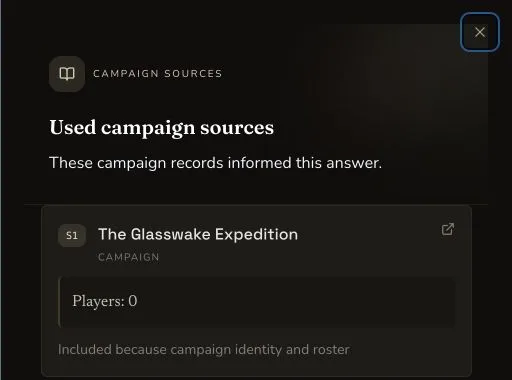
The privacy-safe desktop crop shows the drawer heading and one complete source card.
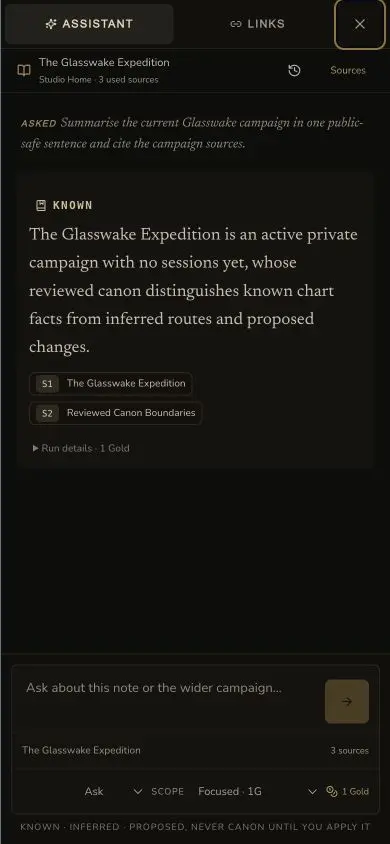
The mobile Assistant preserves the answer, source references and truth boundary in the compact layout.
Read the answer as classified evidence
4. Separate the four truth classes
Campaign Assistant can label content with four evidence classes:
KNOWNis supported by campaign records.INFERREDis reasoned from the cited records.PROPOSEDis a creative option and is not canon.DISPUTEDmeans the campaign records conflict or remain ambiguous.
Do not flatten these labels into one answer. A useful inference can guide your review, but it is still different from a known campaign fact.
5. Open the source drawer
Choose a source chip to open Used campaign sources. Each entry can show its source key, title, record type, excerpt and inclusion reason. The retained privacy-safe crop proves those mounted fields for its S1 campaign record. It does not show optional session or transcript metadata.
6. Check settlement separately
Wait for the run to reach its terminal state. A visible answer, a completed run and a settled Gold entry are separate checks. The retained eight runs completed and settled for their displayed quotes, with no extra charge for the later local review actions.
Checkpoint
Check your result
- Ask or Propose matches the intended outcome, and the active note or selected prose is visible as context.
- The current Focused, Campaign-wide or Deep Prep quote is visible before submission.
- Every factual statement is reviewed with its
KNOWN,INFERRED,PROPOSEDorDISPUTEDclassification. - The used source keys, titles and excerpts support the answer, and the run reaches a settled terminal state.
If something looks wrong
Troubleshooting
- Symptom
- The answer uses the wrong part of the campaign.
- Likely cause
- The active context or selected scope is broader than the question needs.
- Next safe action
- Open the intended note, retain only the required selection and use the smallest useful scope.
- Symptom
- A claim has no useful source context.
- Likely cause
- The source set may not contain the record needed to support that claim.
- Next safe action
- Open Used campaign sources, inspect the included records and revise the question. Do not treat the unsupported claim as known.
- Symptom
- The quoted price differs from this example.
- Likely cause
- The product quote is current, while this tutorial records one retained production journey.
- Next safe action
- Use the mounted quote that Campaign Studio shows before you send.