
Follow Generation and Recover Safely
Track synchronous and asynchronous Workshop generation safely from submission to terminal result.
Submit once, keep the request identity, and look for the existing result before trying again. Start from RPG Workshop and treat the generator form, generation job, entity result, artwork request and campaign recording as separate records.
Follow one identity to a terminal result
1. Review the request, then submit once
Confirm generator type, campaign, brief, conditional controls, art preset and any displayed Gold amount. Press the mounted Generate control once. For normal asynchronous generators, retain the returned job identity or job ID and follow its status until it reaches a terminal result or a clear terminal failure.
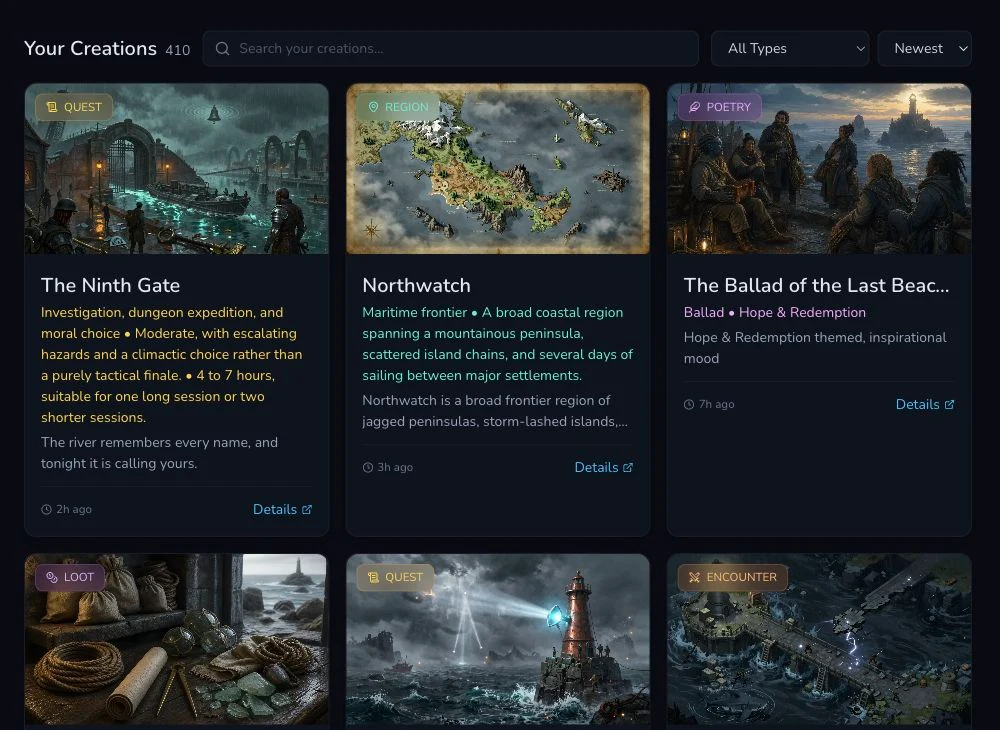
The Workshop result list is the first recovery surface when a local progress view disappears.
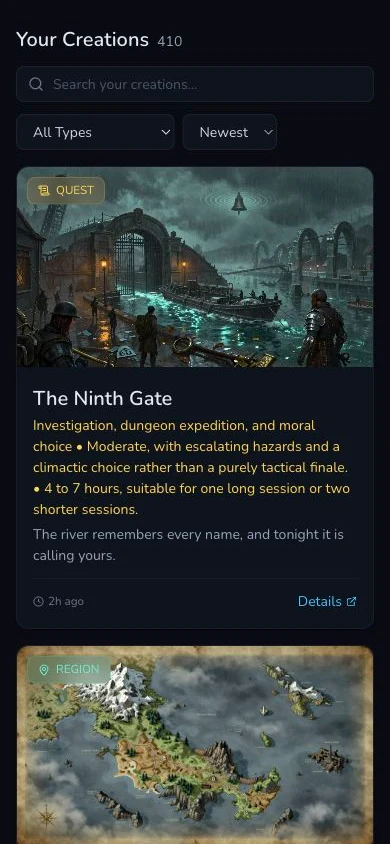
On mobile, use the type and sort controls before deciding that a result is missing.
Know the execution exceptions
2. Use the right recovery model for the selected type
Most Workshop generators are asynchronous and use a job identity with client polling. Loot is the synchronous exception, so it returns its result in the submission request rather than through the common async job loop. Character runs through a separate builder. Region is async but has durable queue recovery, unlike the client-poll-only recovery used by the other asynchronous generators.
There is no general cancellation and stale-job retry API across Workshop generators. Do not invent a cancel-and-restart procedure when the mounted result does not provide one. A stalled progress panel can be a client observation problem while the backend request continues.
Recover without duplicating the work
3. Check the three existing-result surfaces in order
- Return to the Workshop result list. Filter by type and sort by newest.
- Open a matching card's detail route and confirm its name, type and content.
- If a campaign was selected, refresh the campaign and perform a campaign read-back at the expected recording destination.
Also check the art state separately. A completed entity with pending or failed art is not a failed generation. Do not submit the entity brief again to repair an image.
4. Decide from evidence, not from the spinner
If an existing entity or campaign record matches the submitted request, continue from that result. If the job has a clear terminal failure and no result exists on any expected surface, correct the identified input or service problem before one new submission. If the evidence remains ambiguous, preserve the job ID and wait or seek support rather than creating a speculative duplicate.
The Glasswake production walkthrough retained exactly one canonical result for each of the 22 generator types. Its final campaign audit found 15 Memory records, five Workspace items, one Quest Tracker result and one Character recovered through its generation link. Those destinations were established by refresh read-back, not by the success message alone.
What to record during a recovery
- Generator type and intended result name.
- Submission time and job ID, when the route is asynchronous.
- Last observed status and whether it is terminal.
- Matching result-list card and canonical detail route, if present.
- Separate artwork request state, if art was requested.
- Campaign recording destination after refresh.
- Displayed and settled Gold evidence for any paid action.
Checkpoint
Check your result
- One submission is tied to one job identity or the synchronous Loot response.
- The generation reached a terminal result, or its unresolved identity has been retained without a duplicate retry.
- Entity, artwork and campaign-recording outcomes have been checked separately.
- The Workshop result list, detail route and campaign read-back were checked before any new submission.
Troubleshooting
If something looks wrong
Troubleshooting
- Symptom
- The progress screen times out, closes or stops updating.
- Likely cause
- Client polling can stop while the backend request continues, so the local timeout is not a terminal backend result.
- Next safe action
- Keep the job ID, check the Workshop result list and matching detail route, then refresh the campaign destination before considering another request.
- Symptom
- The entity exists but its artwork is missing or still processing.
- Likely cause
- Artwork is a separate request and can settle after the entity generation.
- Next safe action
- Inspect the mounted image state or gallery association. Do not regenerate the entity merely to obtain art.
- Symptom
- Generation succeeded but the campaign does not show the result.
- Likely cause
- Automatic campaign recording is a separate outcome and may use Memory, Workspace, Quest Tracker or a generation link.
- Next safe action
- Refresh the expected destination and search for the canonical result. Resolve the recording outcome without repeating the generation.
- Symptom
- A Region job appears to outlive the browser polling window.
- Likely cause
- Region uses a durable queue and its lifecycle is not limited to the current client poll.
- Next safe action
- Retain the Region job identity and check the existing result surfaces. Do not assume a closed or timed-out browser means the queued work failed.