
Write a Strong Generator Brief
Turn a creative goal into a structured Workshop brief with deliberate campaign and entity context.
A strong Workshop brief says what must be true, provides the smallest useful context, and leaves room for the generator to complete the object. Open RPG Workshop, choose the right type, then complete required, optional and conditional controls in that order.
Build the brief in layers
1. Complete the required controls first
Required controls define the object the endpoint must be able to validate. For the reviewed NPC form these include Gender, Age, Level and Game System. Other generators use different required fields. Set them before writing prose so the brief does not contradict the form.
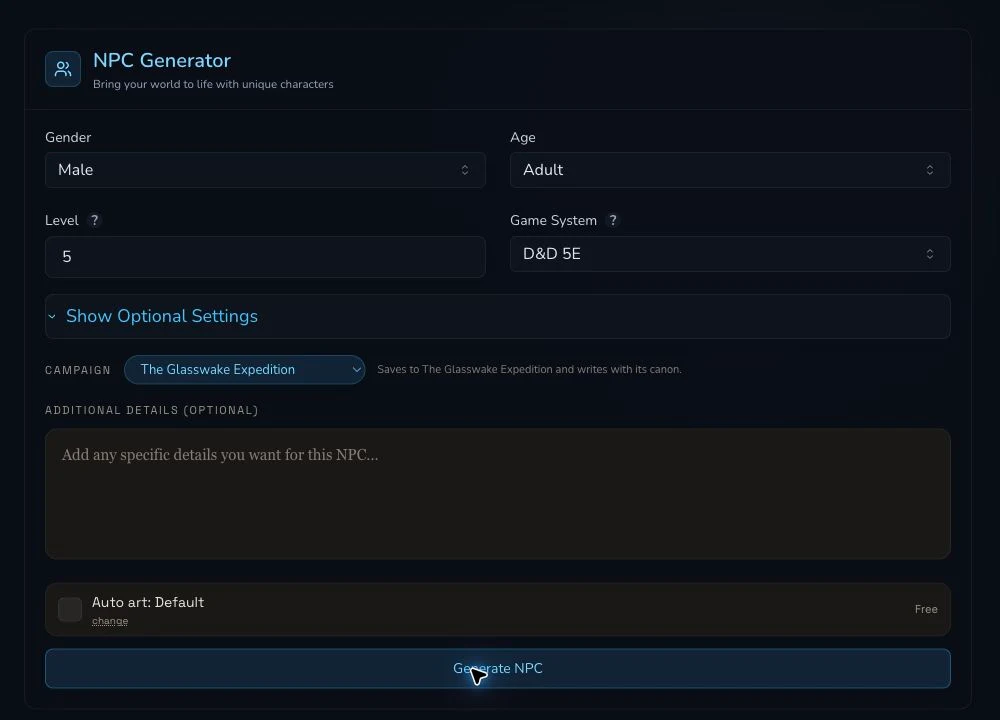
Structured controls carry rules and scope. The brief supplies the distinctive details that those controls do not express.
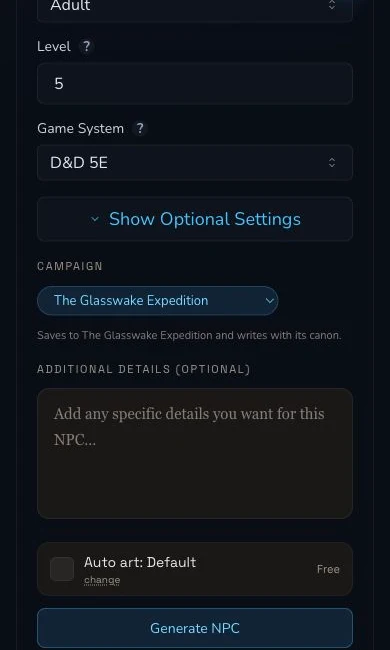
On mobile, review the expanded controls and campaign before reaching Generate.
2. Add one clear purpose and a few constraints
Use concrete nouns and table-facing consequences. A useful NPC brief might say:
A veteran tide-route captain who leads civilian rescues from Veyra's Crossing. Calm under pressure, suspicious of ceremonial authority, and carrying a brass chart case. She needs a public motive, a practical flaw and two ways the party can earn her trust.
This defines role, place, temperament, prop and playable needs. It does not prescribe every sentence, repeat the level and game system, or ask for unrelated world history.
3. Choose campaign context deliberately
Select a campaign when the result belongs to it. Where the mounted form offers them, add explicit entity context for the places, people or groups the result must recognise. Add a relevant paper or document, including a pinned document, only when that control is present and the source is current. Noticed aliases can help the generator recognise alternate names. The Glasswake production pass used explicit entity context, while its campaign had no documents or pinned papers. That empty case must not be presented as proof that a document was used.
Campaign selection affects the generation prompt and triggers an automatic campaign-recording attempt. It does not prove the recording settled. After completion, refresh the campaign destination and check the result there.
Handle conditional controls before prose
4. Resolve the controls that change the meaning of the request
- Class: choose whether the result is a class or subclass. When Subclass is selected, Base Class becomes part of the request. Put mechanical identity in those fields before adding flavour.
- Loot: choose the Loot source, then set Party Level, Loot Theme and Game System. Defeated foes reveals optional Monsters Fought details. Found container instead reveals Container Type, optional Container Context and optional Protection. Loot returns synchronously and does not use the general auto-art or relationship path.
- Pantheon: choose the mode first. Detailed mode exposes deity seeds, so define the deity-level starting points there rather than hiding them in one long general description.
The Character route is a separate builder, not merely another copy of the shared Workshop form. Follow its stages and use its own mounted controls. Dedicated generator pages can also mount controls differently from the Workshop hub, so check the page you will actually submit rather than relying on an older screenshot.
Use a short briefing check
Before submitting, read the form from top to bottom:
- Are all required controls valid?
- Have conditional controls appeared and been completed after their parent choice?
- Does the selected campaign match the intended destination?
- Are explicit entities, papers, pinned documents and noticed aliases relevant and currently available?
- Does the prose state purpose, distinctive constraints and table use without duplicating the structured fields?
- Is the selected auto-art preset acceptable at the displayed price?
Checkpoint
Check your result
- Required controls are complete and do not conflict with the prose brief.
- Optional and conditional controls express the details they own.
- Campaign, entity, paper, pinned document and noticed alias context is relevant and available on the mounted form.
- The final brief is concise, playable and ready for one deliberate submission.
Troubleshooting
If something looks wrong
Troubleshooting
- Symptom
- The result ignores a detail that was repeated several times.
- Likely cause
- The prose may conflict with a structured or conditional control, or too many priorities may compete in one brief.
- Next safe action
- Resolve the structured control first, then keep one purpose and a short list of non-conflicting constraints.
- Symptom
- Base Class, deity seeds or another expected field is missing.
- Likely cause
- The parent mode may not be selected, or the dedicated generator page may mount a different control set.
- Next safe action
- Set the relevant Class or Pantheon mode, then review the live form on the route you intend to submit.
- Symptom
- The generated result does not appear in the expected campaign area.
- Likely cause
- Prompt context and successful generation do not prove automatic campaign recording settled.
- Next safe action
- Refresh the campaign destination and check for the result before editing context or submitting another generation.