
Share and Export Session Notes Safely
Review publication scope, verify the logged-out result and keep recap and transcript exports distinct.
Sharing a Session Note is a publishing decision, not just a way to copy a link. Open the owned detail page at /sessions/{sessionId} before you begin. This guide shows how to review the session-only and campaign-wide choices, verify the public result while logged out, return the session to private, and keep recap and transcript exports separate.
Review the publishing boundary
1. Open the owned session
Open the completed Session Note at Sessions, then choose the session. Confirm the header says Private before beginning. The retained tutorial session was returned to private after its public-access check.
2. Open Share and choose the intended scope
Select Share. When the campaign is private, the dialog offers Also make campaign public and selects it by default. Leave it selected only if the whole campaign should become public. For a session-only publication, clear the checkbox before confirming.
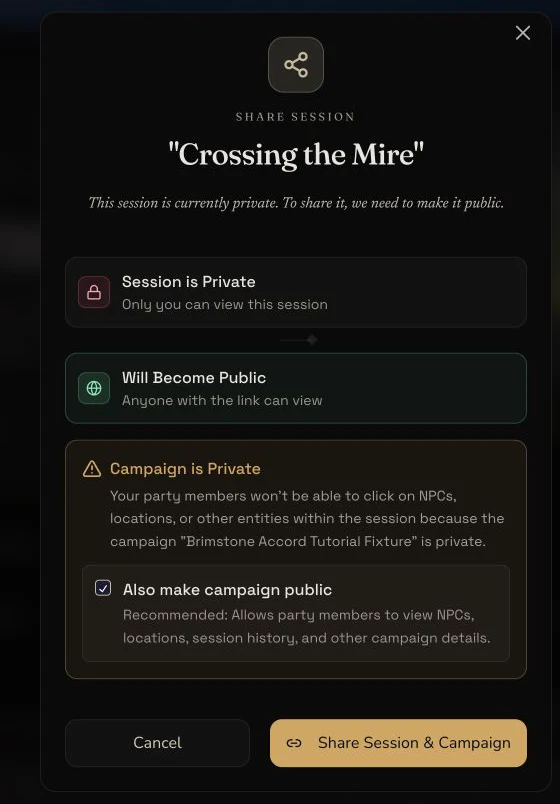
The owner dialog makes the session and campaign choices explicit before any visibility change is submitted.
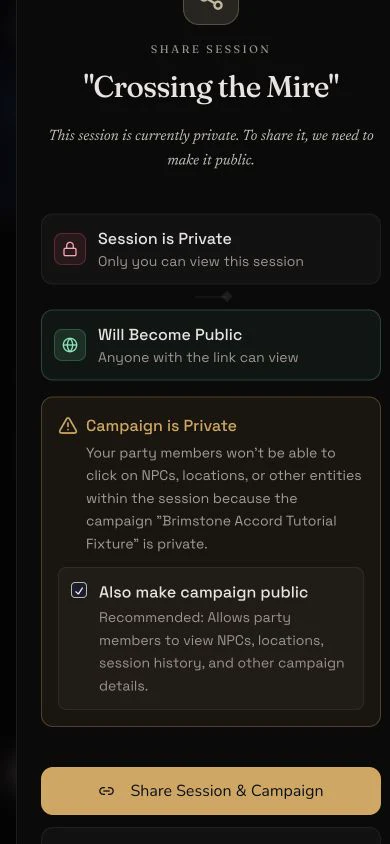
The same publishing boundary remains readable at a 390-pixel mobile viewport. This capture stops before confirmation and changes no state.
3. Copy the link and check it logged out
Confirm the selected scope once. A successful share copies the session URL. Open that exact URL in a fresh logged-out context. Confirm the intended session loads, then check that DM notes and the original written source summary are absent. Also review what is exposed, including recap text, transcript, session media and playable source audio where present.
4. Return the session to private
Back in the owner view, select the public visibility control and return the session to Private. Reload as the owner, then retry the same URL logged out. The retained lifecycle ended with access denied again. Do not assume that closing a tab or leaving the page changed visibility.
Export the right layer
5. Export the recap from the session header
Open Export on the recap page. The current menu offers Obsidian Markdown, generic Markdown, Homebrewery Markdown, JSON, Foundry JSON and Fantasy Grounds XML, with copy and file actions. The retained evidence downloaded and opened the generic Markdown and JSON recap files.
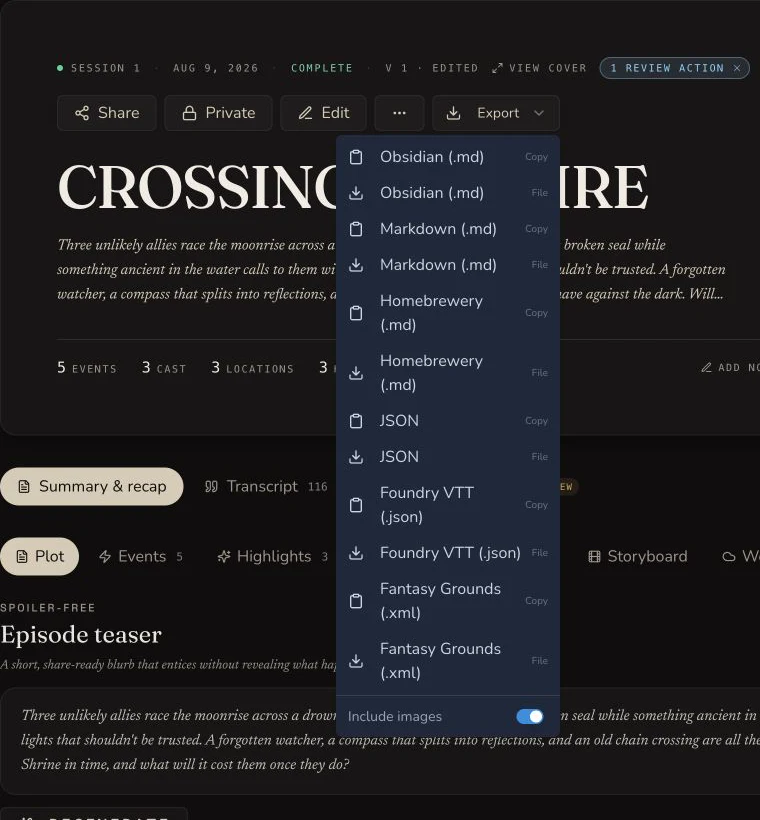
Recap export belongs to the session header. There is no recap PDF option in this menu.
6. Export the transcript from the Transcript tab
Open Transcript and choose Export .txt. This is a different file from the recap exports. The retained text file was opened and checked against the session title, speaker labels and known dialogue.
7. Keep Workspace export separate
Campaign Workspace folder export creates a later vault ZIP containing filed notes, sessions and other supported records. It is not a recap export and it is not the transcript download. Use the Campaign Memory lesson when you need that broader archive.
Delete only with a separate retention decision
8. Treat audio deletion as permanent
An audio-source session can expose Delete Audio beside its player. Confirm that every required transcript, recap and privacy check is complete before using it. Deleting the source audio is separate from deleting the Session Note.
9. Treat session deletion as permanent
Session deletion is available from the owner action menu and requires a confirmation dialog. It removes the Session Note rather than merely taking it out of the Library. The tutorial evidence did not invoke either delete action.
Checkpoint
Check your result
- The public check uses the exact session URL in a fresh logged-out context and never calls it unlisted.
- DM notes and the original written source summary remain visible to the owner but absent from the public response.
- Returning the session to private is confirmed by an owner reload and a second logged-out denial.
- Recap Markdown and JSON plus transcript
.txtremain distinct retained files with verified checksums.
Troubleshooting
If something looks wrong
Troubleshooting
- Symptom
- The share button would publish more than the session.
- Likely cause
- Also make campaign public is selected by default while the campaign is private.
- Next safe action
- Clear the campaign checkbox before confirming a session-only publication.
- Symptom
- The public page exposes more than expected.
- Likely cause
- Public access can include recap, transcript, images and playable audio even though owner-only fields are removed.
- Next safe action
- Return the session to private immediately, review every exposed surface, and publish again only after consent is confirmed.
- Symptom
- The exported file does not contain transcript dialogue.
- Likely cause
- The session-header export produces recap formats, not the transcript file.
- Next safe action
- Open the Transcript tab and use Export .txt.
- Symptom
- A logged-out reader can still open the session after it was made private.
- Likely cause
- The owner view may not have completed or refreshed the visibility change.
- Next safe action
- Reload the owner page, confirm the Private state, then retry the exact URL in a fresh logged-out context.
Limitations
- Public sessions are not described as unlisted because their route emits indexable metadata.
- The public response protects DM notes and the original written source summary, but the recap, transcript, media and playable audio may still be public.
- There is no recap PDF export in the current session interface.
- Transcript export is
.txtonly. Transcript JSON and PDF are not mounted. - Only the retained generic Markdown and JSON recap files plus transcript
.txtwere opened and checksum-verified in this walkthrough. - Audio deletion and session deletion were reviewed as permanent controls but were not invoked.