
Choose the Right Session Notes Source
Compare file, URL, transcript and written-summary inputs before spending Gold.
Choose the source that preserves the features you need, then read the live estimate before submitting. Open Create Session Notes to compare the five visible choices. They persist as three source types: audio, transcript and summary.
Before you choose
Decide what you need from the finished session:
- Do you need a playable copy of the source audio?
- Do you need a searchable transcript and speaker views?
- Do you already have a complete transcript, or only a prose account of events?
- Can the source be uploaded, or is there a stable direct file link?
- Is the written-summary option available on your account?
Prices below describe the reviewed product contract on 9 August 2026. Check the estimate in your own completed form because pricing and entitlements can change.
Compare all five source choices
1. Open the source selector
Open Create Session Notes. The current selector offers File Upload, Audio URL, Transcript Text, Transcript URL and Session Summary.
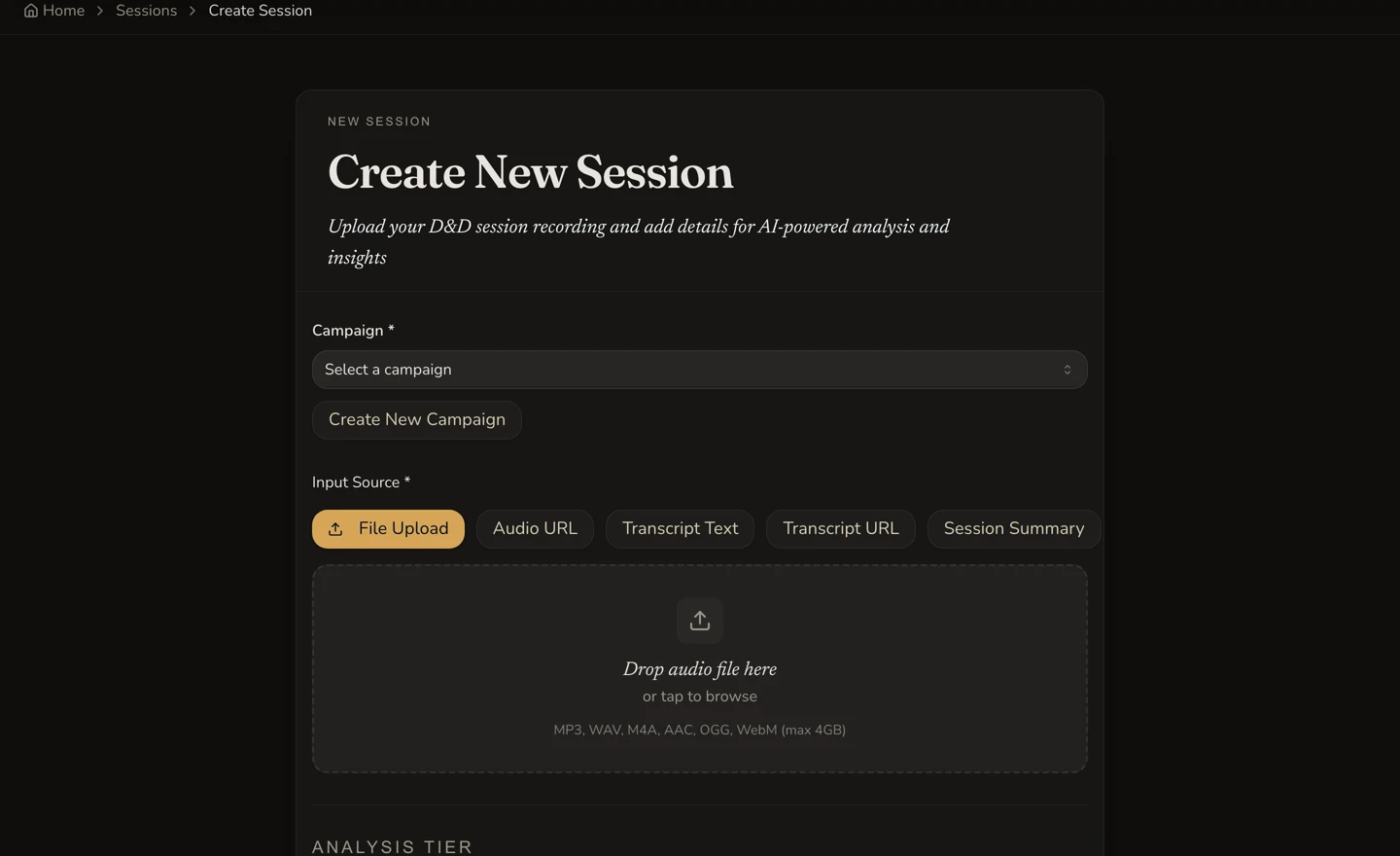
Five visible choices become three persisted source types.
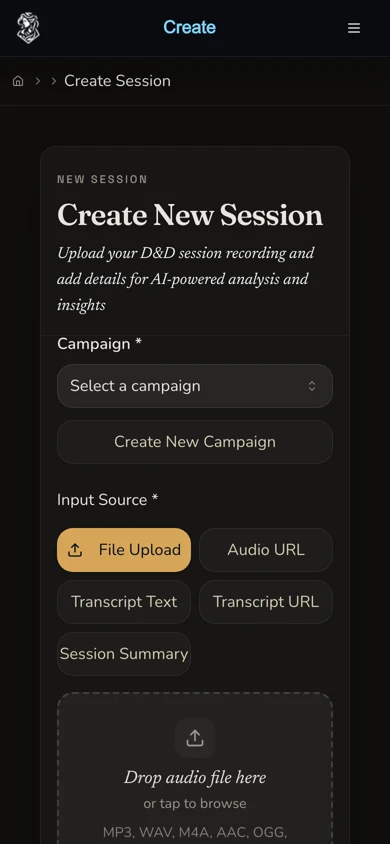
On mobile, review the full selector before entering or attaching the source.
| Visible choice | What you provide | Persisted source type | Result features | Reviewed pricing basis |
|---|---|---|---|---|
| File Upload | An owned audio file | Audio | Recap, generated transcript, speaker attribution and audio player | Standard: 45 Gold per started hour. Pro: 100 Gold per started hour. Minimum one hour. |
| Audio URL | A permitted direct link to an audio file | Audio | Recap, generated transcript, speaker attribution and audio player | Standard: 45 Gold per started hour. Pro: 100 Gold per started hour. Minimum one hour. |
| Transcript Text | The complete transcript as plain text | Transcript | Recap, searchable transcript and speaker views where the text supports attribution. No audio player. | Standard: 30 Gold per started 9,000-word band. Pro: 65 Gold per started 9,000-word band. Minimum one band. |
| Transcript URL | A permitted direct link to a transcript file | Transcript | Recap and searchable transcript. No audio player. | The form starts from the one-hour floor. The current initial creation charge is not recalculated after the backend fetches and measures the transcript: 30 Gold Standard or 65 Gold Pro, unless the eligible first-session credit applies. |
| Session Summary | A prose summary of 200 to 20,000 characters | Summary | Recap, entity extraction and timeline updates at Pro quality. No generated transcript, speaker attribution or audio player. | Flat 30 Gold. Subscriber-only. The first-session credit does not apply. |
Match the source to the outcome
2. Choose audio when voices and playback matter
Use File Upload when you have the owned file locally. Use Audio URL only when the direct file link is stable and fetchable. Both paths can produce a transcript and speaker attribution while retaining a playable audio source.
The duration is detected rather than manually typed. Audio pricing rounds up to a started hour, with a one-hour minimum. A reviewed 30-minute Standard audio source displayed and settled at 45 Gold after one submission.
3. Choose transcript when the words already exist
Use Transcript Text when you can paste the full plain-text transcript. This gives the form enough text to estimate one billing band for each started 9,000 words. A reviewed 1,537-word Standard transcript displayed 30 Gold and settled at 30 Gold.
Use Transcript URL when a direct transcript file is the only practical source. The form cannot measure that text before the backend fetches it, so it shows a one-hour floor. Under the current contract, a successful initial transcript-URL request keeps that floor as its final creation charge instead of reconciling it after fetch. A later full-transcript reprocess is a separate paid action, not settlement of the original creation.
4. Choose summary when you need a recap without transcript features
Use Session Summary when you have a prose account of the session rather than audio or a full transcript. Enter 200 to 20,000 characters and include the people, places, items and decisions that matter.
This subscriber-only path costs a flat 30 Gold and runs at Pro quality. It can produce the recap, entity extraction and timeline result, but it does not create a transcript, speaker attribution or an audio player. The original written source summary and DM notes remain owner-only when a session is public.
Account for the first eligible session
5. Check whether the first-session credit applies
The first eligible non-summary session may be free and is forced to Pro quality. The form hides the Standard and Pro choice when this credit applies. Do not infer the credit from an old screenshot or a general account claim. Read the current form on the account that will submit.
The summary path is different. It remains a flat 30 Gold, requires the relevant subscription and does not consume the first eligible non-summary credit.
Treat the estimate and charge as separate evidence
6. Read the configured estimate, then submit once
Complete the source, campaign and tier choices before reading the amount. For pasted transcripts, the form estimates started bands from the text. For audio, it uses detected duration. For transcript URLs, it starts from the one-hour floor. For summaries, it shows the flat price.
The displayed amount is the decision point before submission. It is not proof of settlement. Press the creation control once, follow that request to a terminal result, then use the completed session or account transaction record to confirm the settled charge.
Checkpoint
Check your result
- The selected mode matches the source you own and are permitted to process.
- You know whether the result should keep audio, transcript and speaker features before submitting.
- The live estimate was read after the final source and tier choices, including any first-session credit shown by the form.
- One request reached a clear outcome, and its settled charge was checked separately from the pre-submission estimate.
Troubleshooting
If something looks wrong
Troubleshooting
- Symptom
- The Audio URL or Transcript URL is rejected or cannot be fetched.
- Likely cause
- The address may lead to a web page, require authentication, expire or block direct file access.
- Next safe action
- Use a permitted direct file link, or switch to the matching upload or pasted-text mode when you own the source locally.
- Symptom
- The Session Summary option is unavailable or will not submit.
- Likely cause
- Summary creation is subscriber-only and the text must contain 200 to 20,000 characters.
- Next safe action
- Check the account entitlement and character count. Use Transcript Text only when you actually have a full transcript, not as a way around summary validation.
- Symptom
- The duration or estimate does not match an earlier screen.
- Likely cause
- Source mode, detected audio duration, transcript word band, tier or first-session credit may have changed.
- Next safe action
- Return to the completed source form and use the amount shown immediately before submission. Confirm the final charge separately after the request settles.
Limitations
- The form does not promise support for every audio format. Use the current accepted-file guidance shown by File Upload.
- A direct URL must remain fetchable long enough for the service to read it. A share page is not necessarily a direct file URL.
- A summary-source session has no generated transcript, speaker attribution or audio player.
- Transcript URL creation currently keeps its initial one-hour floor rather than reconciling the successful charge after fetch.
- A first eligible non-summary session may be free, but that is account state shown by the live form, not a general monthly allowance.