Write five short parts, in this order: subject, what moves, camera, place and light, finish.
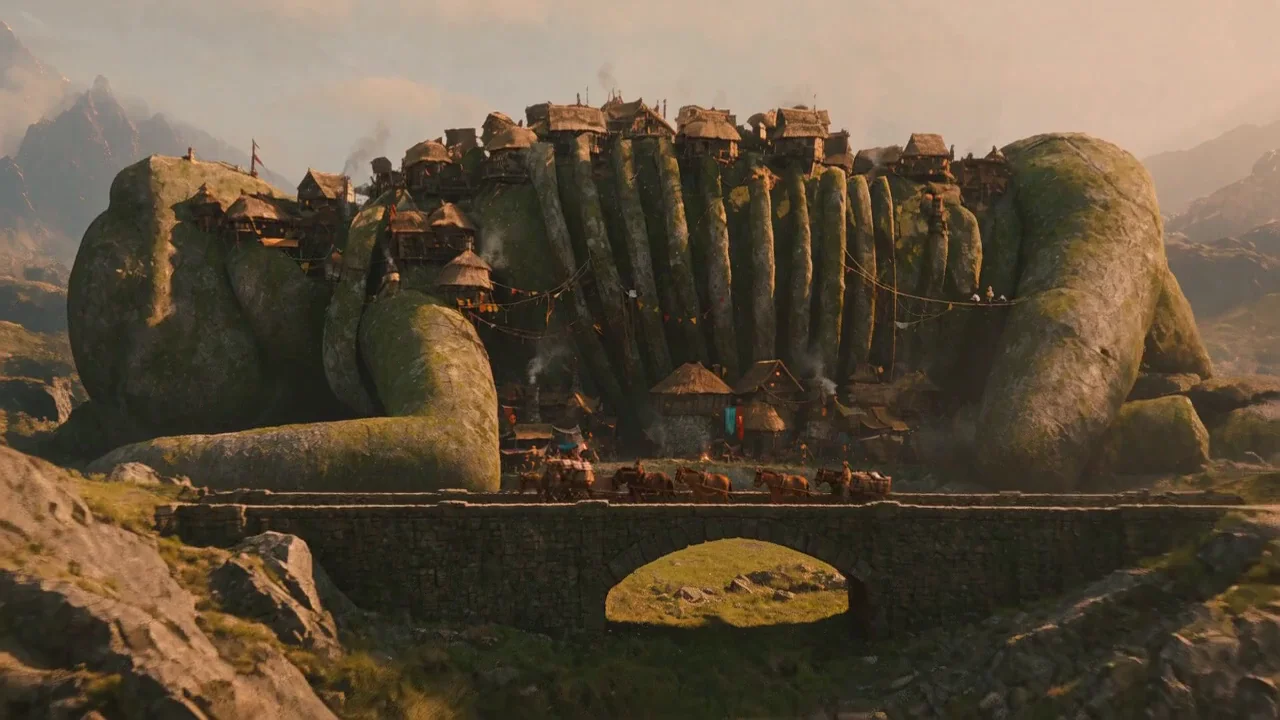
Wide establishing shot of a toll town built along the back of a fallen stone giant. Houses line the spine, rope bridges hang between the ribs. A mule caravan walks across a causeway in the foreground, market smoke rises and drifts, banners move in the wind. The camera pushes in slowly. Late afternoon, long shadows, muted greens and rust. Painterly fantasy landscape.

She shifts her weight on the barge pole and turns her head to look down the canal. Mist drifts behind her. The camera holds still.
Seedance 2.5 Flash Turbo is ByteDance's faster Turbo variant of Seedance 2.5 Flash. On WaveSpeed, it generates at 480p and upscales to 720p or 1080p so you get higher-resolution clips at Flash-level pricing. On CharGen, it makes 4 to 30 second clips with synced sound included in the same pass. A 5 second 720p clip costs 100 gold, and 5 seconds at 1080p costs 125 gold, making it the lowest-cost 720p and 1080p entry in the Seedance 2.5 lineup.
CharGen picks the right WaveSpeed route from what you attach in the sidebar. A prompt alone runs text-to-video. Uploading a start picture switches to image-to-video, with an optional last frame to steer where the motion ends. Adding reference pictures or saved characters with no start picture runs reference-to-video, supporting up to 10 pictures in total (the phone app can also send 1 reference video and 1 sound file, and the API can send up to 5 of each). Opening the Edit tab with a source clip runs video edit, keeping the source length and motion while changing characters, lighting, or setting.
Structure text prompts in five short beats: subject and framing first, one to three moving elements with clear verbs, one camera instruction or a still-camera hold, the setting and light, and the visual finish. When you use references or edit a video, name each attachment in upload order as @Image 1, @Video 1, or @Audio 1 and state its role. When animating a start picture, describe only the movement and camera hold so the model preserves the original composition.
Choose any duration from 4 to 30 seconds on create and reference runs. Plain text, image, and reference-image runs cost 20 gold per second at 720p and 25 gold per second at 1080p, so a 10 second clip is 200 gold at 720p or 250 gold at 1080p, and 30 seconds is 600 or 750 gold. When reference videos are attached with no start picture, input clips bill 12 gold per second (minimum 2 seconds per clip, capped at 30 seconds combined) plus 13 gold per output second at 720p or 18 at 1080p. Video edits keep the source clip duration (clamped 4 to 30 seconds) and cost 25 gold per source second at 720p or 30 at 1080p.
A prompt alone, a start picture with an optional last frame, or up to 10 reference pictures. The phone app can also send 1 reference video and 1 sound file, and the API can send up to 5 of each. A start picture and references do not go together: when you add a start picture, the clip animates from that frame and ignores references.
720p and 1080p, with clips from 4 to 30 seconds. WaveSpeed notes that the model generates at 480p and upscales to the chosen 720p or 1080p output.
Plain text-to-video, image-to-video, and reference-picture or audio runs cost 20 gold per second at 720p and 25 gold per second at 1080p. A 5 second clip is 100 gold at 720p and 125 gold at 1080p. When you attach reference videos with no start picture, it costs 12 gold per second of input video plus 13 gold per output second at 720p (18 at 1080p). Sound is free.
Yes. In the Edit tab, upload a video and describe the change, for example "turn the knight into the storm warden in @Image 1". Motion and camera work stay while the look changes, and you can add up to 10 reference pictures or saved characters. With sound on, Flash Turbo creates new audio; with sound off, it keeps the input video track. Edits cost 25 gold per source second at 720p and 30 gold per source second at 1080p (source clamped from 4 to 30 seconds). A 5 second edit is 125 gold at 720p.
It is for subscribers. A free account gets 1 dedicated try of Seedance 2.5 Flash Turbo. The try still uses the normal gold for the clip.
No. Synced sound is on by default and the gold price is identical with sound on or off. Turn it off if you want a silent clip for your own music or voiceover.
Yes, whenever you do not upload a start picture. Your saved character pictures count toward the 10-picture reference limit on both reference-to-video and video edit. With a start picture, the clip uses only that start picture.
16:9, 9:16, 4:3, 3:4, 1:1 and 21:9 when starting from a prompt or from references. When starting from a picture or editing a source video, the output follows the input frame.
Pick Flash Turbo when you want 720p or 1080p at Turbo pricing: 5 seconds at 720p is 100 gold on Flash Turbo versus 175 gold on regular Flash, and 1080p is 125 gold (not offered on regular Flash). Pick regular Flash when you want native 480p drafts without upscaling.
Pick Flash Turbo for lower rates across every mode: 20 or 25 gold per second plain versus 30 or 35 on Seedance 2.5 Turbo, and 25 or 30 gold per source second for video edit versus 60 or 70 on Seedance 2.5 Turbo.
