
Write Image Prompts You Can Debug
Write a structured prompt and improve it one variable at a time.
Write a prompt as a small, testable brief. The worked comparison below uses the same reviewed model, square size and reference image for every request. It changes only the stated scene clause in the final revision.
Give every prompt a job
1. Turn the image goal into named parts
Give each part of the request a clear job. In the reviewed structured prompt, the subject is the astronomer and minotaur guide. Their action is standing beside one another. The setting is a desert with a distant ruined observatory. The composition is both characters full length, and the viewpoint is the wide scene implied by that framing.
The remaining parts make the direction easier to inspect: sunset or blue hour supplies the lighting; practical fantasy clothing supplies the style; the midnight-blue coat and brass star chart name important materials and details; and “no text, no logo” gives the exclusions. A reference image is a separate instruction here: keep the astronomer's coat and star chart recognisable.
Compare vague and structured prompts
2. Keep the comparison conditions fixed
The receipt records these three requests on Flux 2 Flash, 1:1, with the same attached astronomer reference. The vague request was:
Put this astronomer in a desert with a minotaur.
The structured request was:
Use the astronomer from the reference image. Keep the midnight-blue coat and brass star chart recognisable. Show the astronomer standing beside a horned minotaur guide in a wide desert at sunset, both full length, windswept sand, distant ruined observatory, practical fantasy clothing, cinematic but natural light, no text, no logo.
The second version gives you concrete checks for character details, relationship, framing, terrain, background, light and exclusions. It does not promise an identical character or a deterministic result.
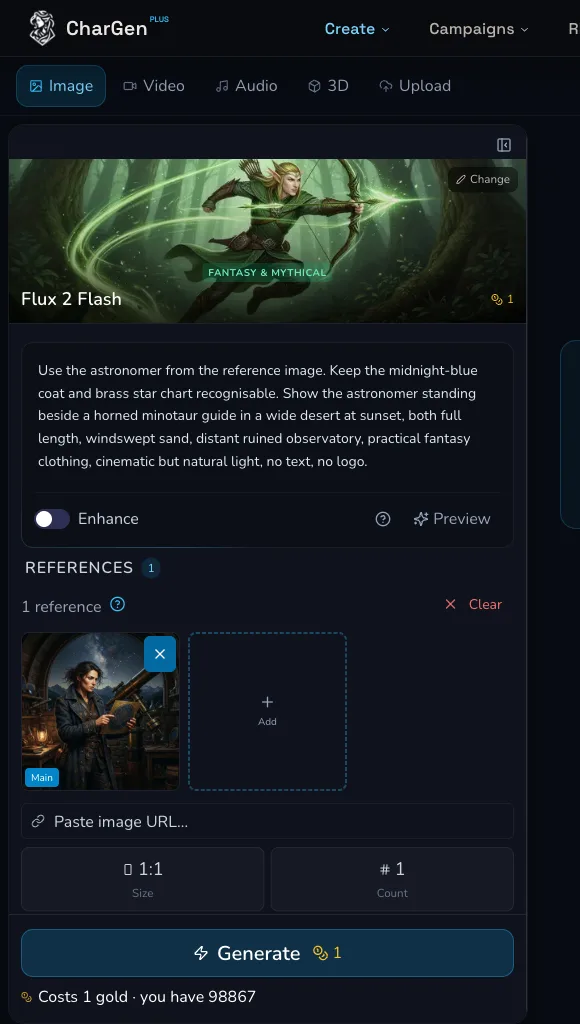
The structured request before submission. The form shows the reviewed enhancement state, off.
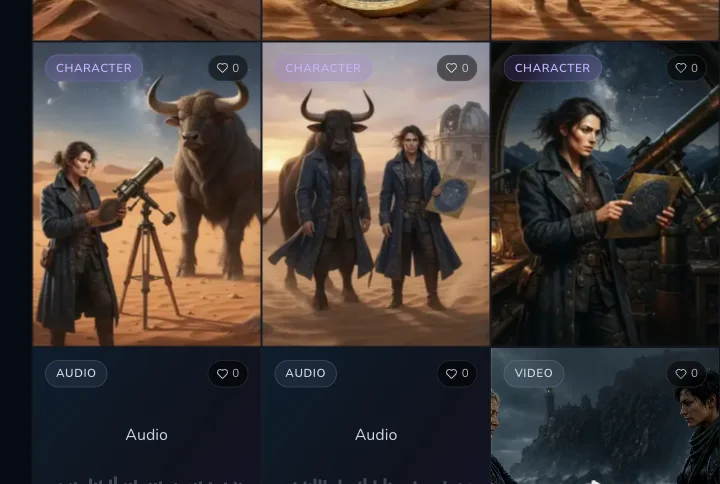
The reviewed output comparison. The evidence receipt links each result to its exact vague, structured or controlled prompt.
Change one clause at a time
3. Make a controlled revision
Copy the structured prompt, then alter one clause only. The reviewed controlled prompt was:
Use the astronomer from the reference image. Keep the midnight-blue coat and brass star chart recognisable. Show the astronomer standing beside a horned minotaur guide in a rocky desert at blue hour, both full length, windswept sand, distant ruined observatory, practical fantasy clothing, cinematic but natural light, no text, no logo.
The only recorded change was “wide desert at sunset” to “rocky desert at blue hour”. The receipt's finding is narrow: the palette and terrain changed while the paired full-length characters and ruined observatory remained clear. That is useful evidence about one revision, not a general rule for every model or run.
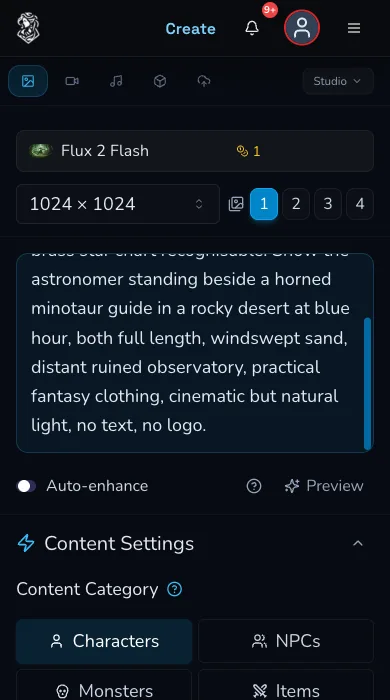
The mobile controlled revision. The scene clause changed while the rest of the prompt stayed fixed.
Review prompt enhancement
4. Treat enhancement as a separate choice
The reviewed Flux 2 Flash comparison had prompt enhancement off. The form exposed an Enhance control and a preview path, but this evidence did not invoke enhancement. If a current model offers enhancement, review the changed wording before submitting because it can change the intent you were testing. If it is absent, do not assume it is available for that model.
Check negative-prompt support
5. Confirm the selected model's prompt controls
The comparison receipt records a negative prompt as used for Flux 2 Flash. Negative Prompt was also reviewed as a model-dependent control: it was present for Flux 2 Flash and absent in the reviewed states for Nano Banana 2 Lite, GPT Image 2 and Seedream 5.0 Pro. Check the controls that mount after selecting your model. When no negative-prompt field appears, keep exclusions in the main prompt, such as “no text, no logo”.
Diagnose an unexpected result
6. Compare the image with the clause that should control it
Start with the prompt's jobs, not a new pile of instructions. If the astronomer is wrong, strengthen subject and retained-detail language. If the scene is wrong, adjust the setting clause. If the frame is crowded, revise composition or viewpoint. If the atmosphere is wrong, change lighting before changing everything else. Preserve the prompt, model, size, count and reference while you test one next clause.
Checkpoint
Check your result
- The subject, action and setting are each explicit.
Composition, viewpoint and lighting say what you need to review.
Style, materials and exclusions are present only when they matter.
Your next test changes one named clause and keeps the other conditions stable.
Troubleshooting
If something looks wrong
Troubleshooting
- Symptom
- The image contains the right subjects but the scene is unclear.
- Likely cause
- The setting, composition or viewpoint clause may be too broad.
- Next safe action
- Rewrite one of those clauses with a reviewable detail, then keep the other settings fixed for one deliberate test.
- Symptom
- A revision changes several things at once.
- Likely cause
- More than one prompt clause or request setting changed.
- Next safe action
- Restore the previous prompt and change only one declared clause before comparing the next result.
- Symptom
- The prompt controls differ after choosing another model.
- Likely cause
- Enhancement and Negative Prompt are model-dependent reviewed states.
- Next safe action
- Read the controls that are currently mounted and do not carry a setting across as a promise.