
Dev Notes: Why Our AI Battlemaps Came Out Isometric
Our battlemap prompt asked for an isometric view by mistake. What we found in the old prompt, what we changed, and before and after maps.
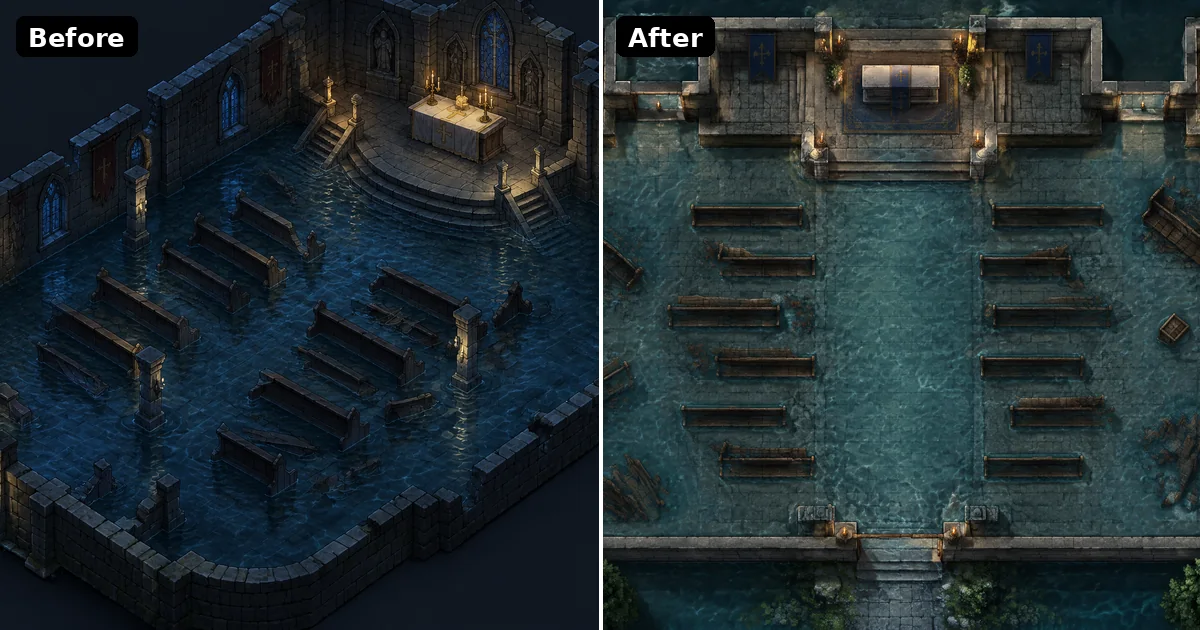
I built the first version of the CharGen battlemap generator when Flux.Dev, SDXL and Dall-E 3 were the models most people used. The prompt behind it was written for those models. Image models have changed a lot since then, and the prompt did not keep up.
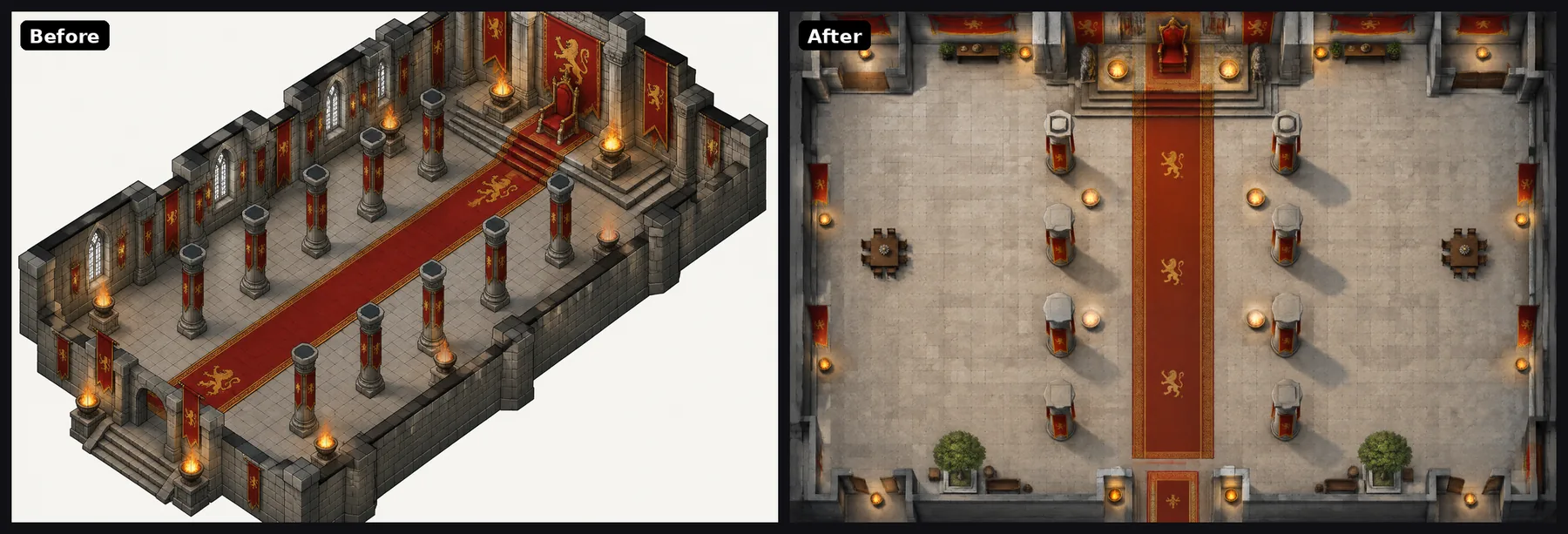
The result was a map that looked good at first sight and was wrong for the table. You asked for a battlemap, and you got a pretty diorama at a three-quarter angle, often with a title card, a compass rose and a scale bar painted into the corner. That is fine for a poster. It is not fine when you drop the image into Foundry or Roll20 and try to put tokens on it.
These notes cover what I found when I took the whole battlemap flow apart, what I changed, and what the maps look like now. I show pieces of the prompt where they explain a result. I do not publish the full prompt.
The word that turned every map sideways
Every battlemap request from the battlemap page went through one step in our worker. That step added a short line in front of your words. This is the line, word for word:
Generate a planimetric view isometric view rpg map of the following:
Read it slowly. A planimetric view is a flat plan seen from directly above. An isometric view is the angled view you see in city builders and old strategy games. The line asks for both at once.
With SDXL and Flux.Dev this did less harm than you might expect. Those models read a prompt more like a bag of tags. "Map", "rpg" and "view" pulled the result toward a map, and the conflict between the two camera words mostly washed out.
Current models read a prompt as an instruction, and they follow it. When I tested the old line on GPT Image 2.5 Flare, the model treated "isometric" as the thing I wanted. Six scenes went in. Six maps came back at an angle. Not one of them was usable as a top-down battle map.
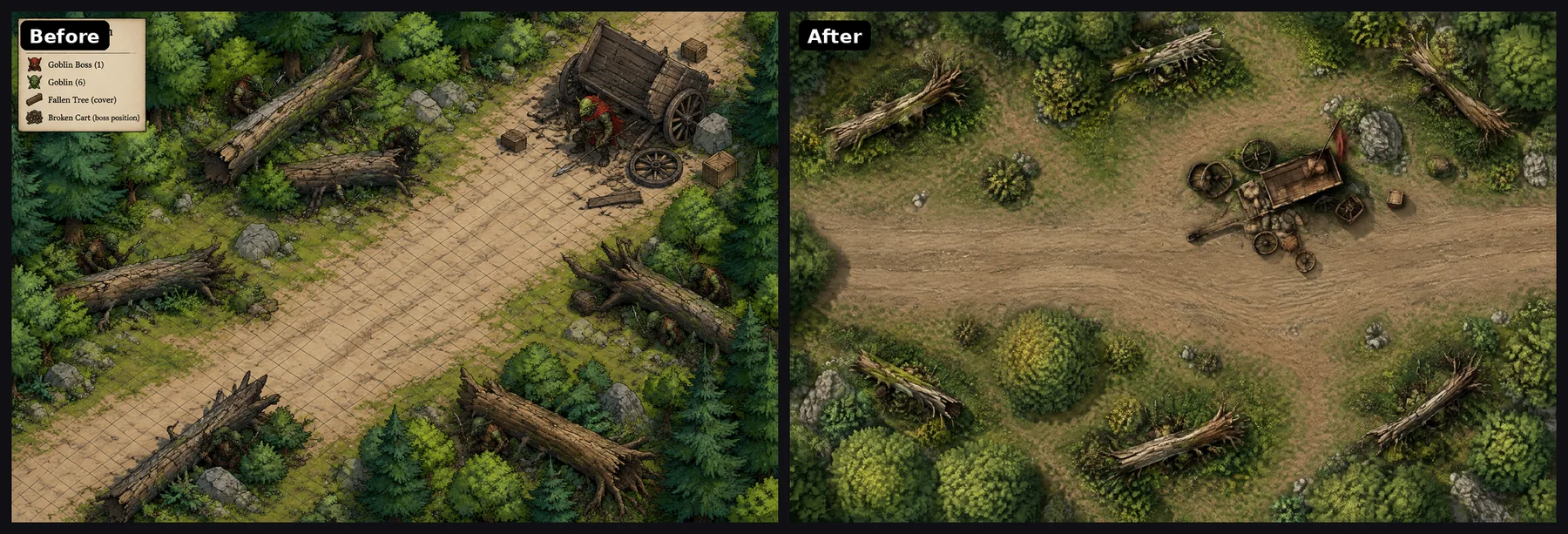
The same models also took "rpg map" as a request for the whole package that a fantasy map has in a book. Four of the six added text: a title card, labels with arrows, a legend, a compass rose or a scale bar. One of them drew a grid on the road and put the goblin boss in the picture.
Too many hands on one prompt
The prefix was the loudest problem, but it was not the only one. When I traced a request from the button to the image model, I found three places that each added their own words.
The first was the prefix above. The second was a style preset. The third was a general prompt enhancer that rewrites short prompts into longer ones. Each of these was written at a different time for a different purpose. Nobody had read the final text that reached the model from start to end.
The outcome was a prompt that argued with itself. One part asked for a flat plan. Another part asked for a cinematic mood. Another part asked for rich detail, which the model often read as walls with visible faces and furniture drawn from the side.
A few smaller problems made it worse:
- Keyword detection. A free-form request became a battlemap only if it contained a phrase such as "battle map". The check was case-sensitive, so "Battlemap of a crypt" was missed. It was also too eager, so a portrait of an old general "leaning over a battle map on the table" could turn into a map.
- An old LoRA. Many of the older open models got an extra battlemap LoRA, a small add-on model trained on map art. That one was trained to paint a square grid into the map, so the grid came back even when the prompt did not ask for it. It is no longer loaded.
- Size. A landscape map was 1536 by 1024 pixels. At 30 by 20 squares that is about 51 pixels a square, which looks soft when you zoom in on a VTT.
- The Foundry export. The scene file used the image's pixel size with a 100 pixel grid. A 30 by 20 map came into Foundry as a bit over 15 by 10 squares.
One owner for the words
The main change is simple to say. Battlemap wording now has one owner in the code. Nothing else is allowed to add to it. The prefix is gone, the enhancer does not touch battlemaps, and style comes in as one line inside the frame instead of a second prompt.
Your sentence goes to the model exactly as you typed it. Around it there is a fixed frame that says what a battlemap is. I will not paste the whole frame here, but these are the parts that did the most work.
One camera. The frame asks for one view and describes it in plain physical terms instead of photography words:
strict top-down orthographic plan view ... walls show only their top edges as solid bands of even thickness
The second half matters more than the first. "Top-down" alone still lets some models tilt the camera a little. Telling the model what a wall looks like from above gives it something it can check against.
Scale from the size you picked. The frame tells the model how many 5-foot squares the image covers, and which way north is. A landscape map is described as 150 by 100 feet. That helps doors and corridors come out at a sensible width.
Room to play. A battlemap needs open floor. The frame asks for most of the floor to be walkable, with clear lanes between cover and hazards. Before this, busy scenes often had no space for tokens.
What to leave out. This is where different models need different wording. The OpenAI models follow an explicit list well, so they get one:
Leave out: people, creatures, tokens and miniatures; text, letters, numbers, labels, a title, a legend and a compass rose; grid lines ...
Google's image models and Seedream behave differently. If you name a thing in the prompt, even in a list of things to avoid, it can appear. For those models the frame describes the clean result instead, and it never uses the word "grid".
The grid belongs in the download, not the art
I decided early that the image model should never draw the grid. When a model draws one, the lines drift, the cells change size across the image, and props sit on top of the lines. None of that matters on a poster. It matters a lot when a spell has a 20-foot radius.
CharGen now draws the grid when you download the map. You pick Roll20, Foundry VTT, Fantasy Grounds or print, and square or hex. The grid is even because code draws it, and it matches the scale your VTT expects. The same rule now applies to the Sketch to Battlemap workflow, which used to ask the model to add a grid.
Bigger maps for the same gold
GPT Image 2.5 can render exact custom sizes, and its price depends on quality and pixel count. By our pricing formula, a landscape map at 2304 by 1536 costs the same 2 gold at Low quality as the old 1536 by 1024. So the landscape default is now 2304 by 1536, which is about 77 pixels a square at 30 by 20. Portrait is 1536 by 2304.
Square maps cost more tokens for the same side length. 1360 by 1360 is the largest square that stays at 2 gold, so that is the square size. The Foundry scene file now uses the map's squares, so a landscape map imports as 30 by 20 squares with the grid lined up.
The test: same sentence, old prompt and new prompt
I did not want to judge this on one lucky image. I took six scenes, including the sentences from the battlemap page, and sent each one twice to GPT Image 2.5 Flare at Low quality. One copy used the old prompt at the old size. The other used the new frame at the new size. Both went through our production system, so the only change was the prompt and the size.
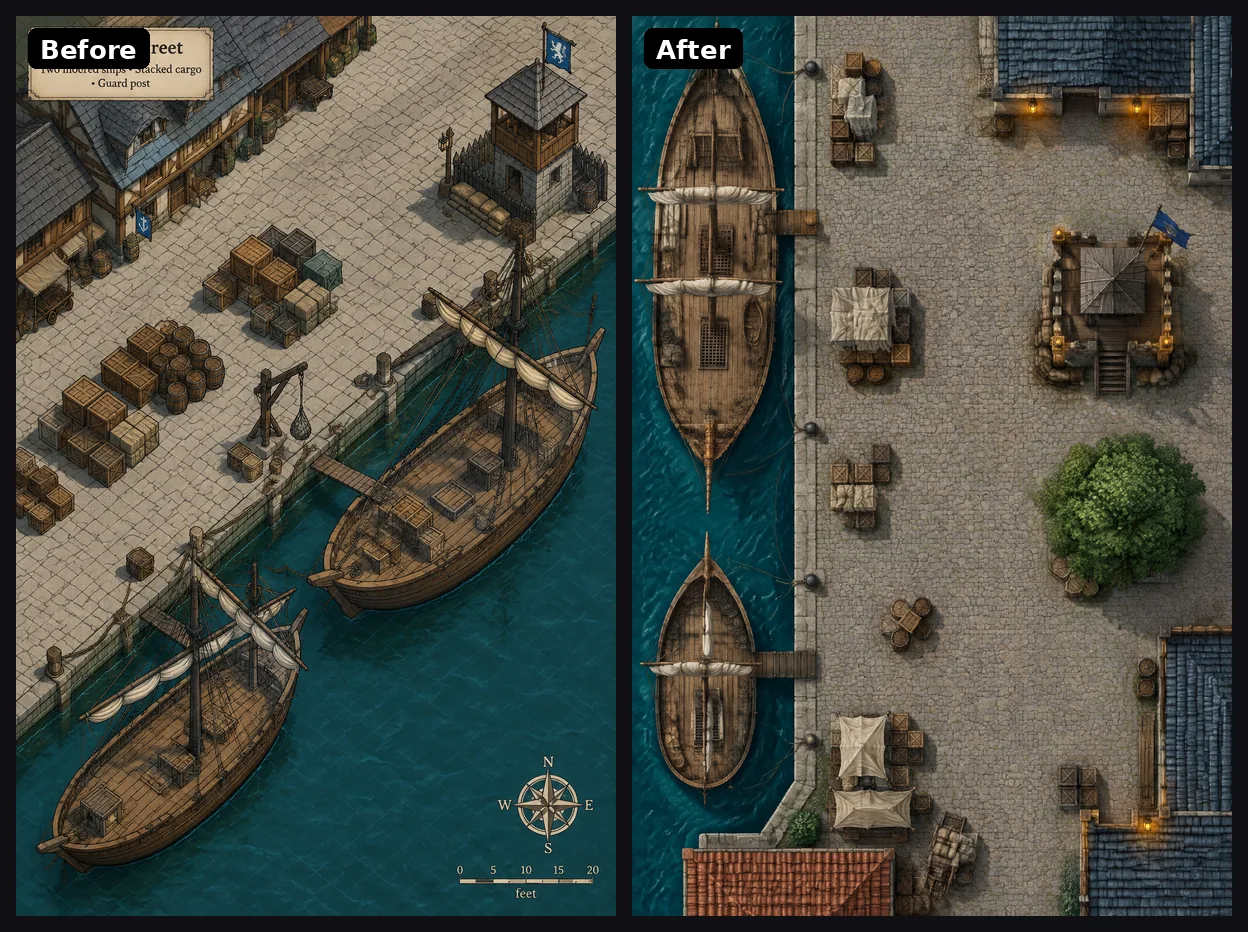
Old prompt: six out of six maps at an angle, four with text, one with a painted grid, one with a creature. New prompt: six out of six top-down, with no text, no creatures and no painted grid.
My own mistake: an example is a target
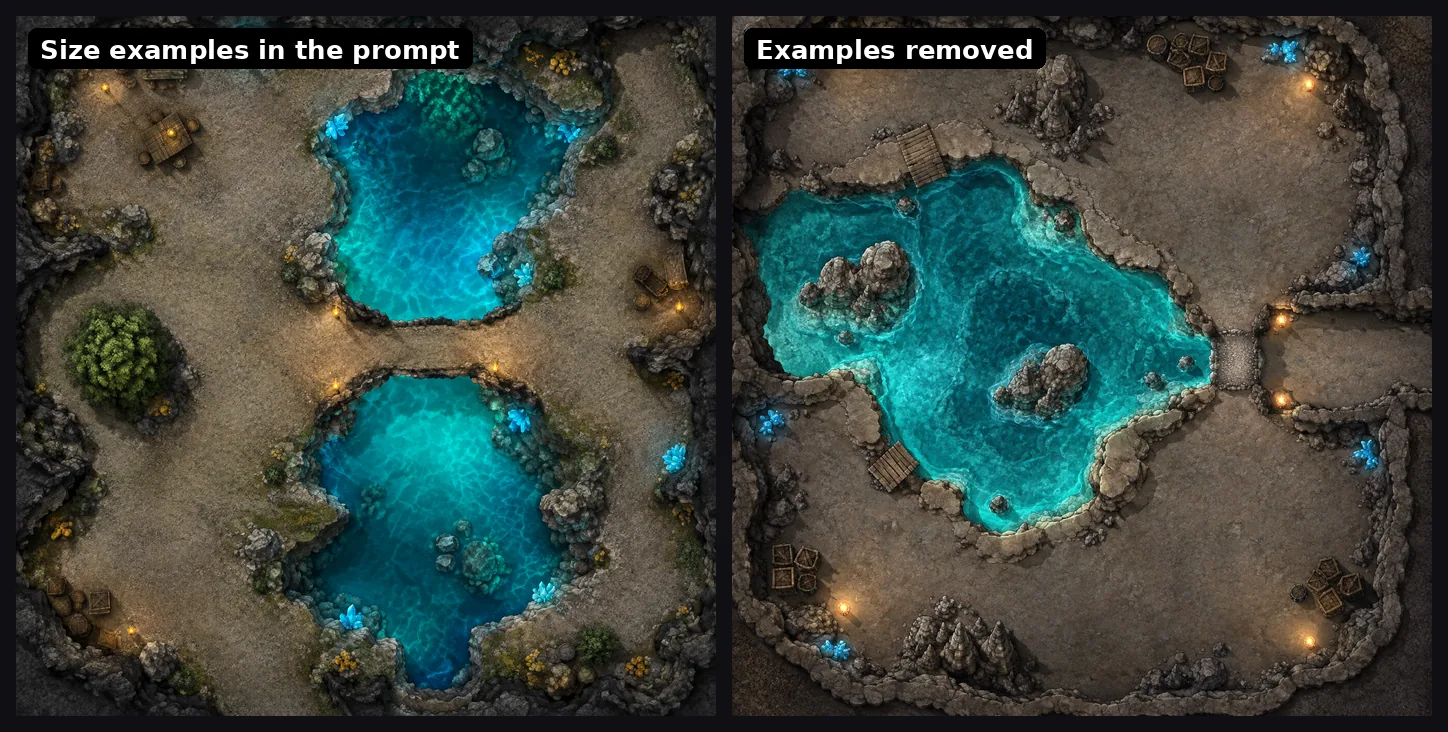
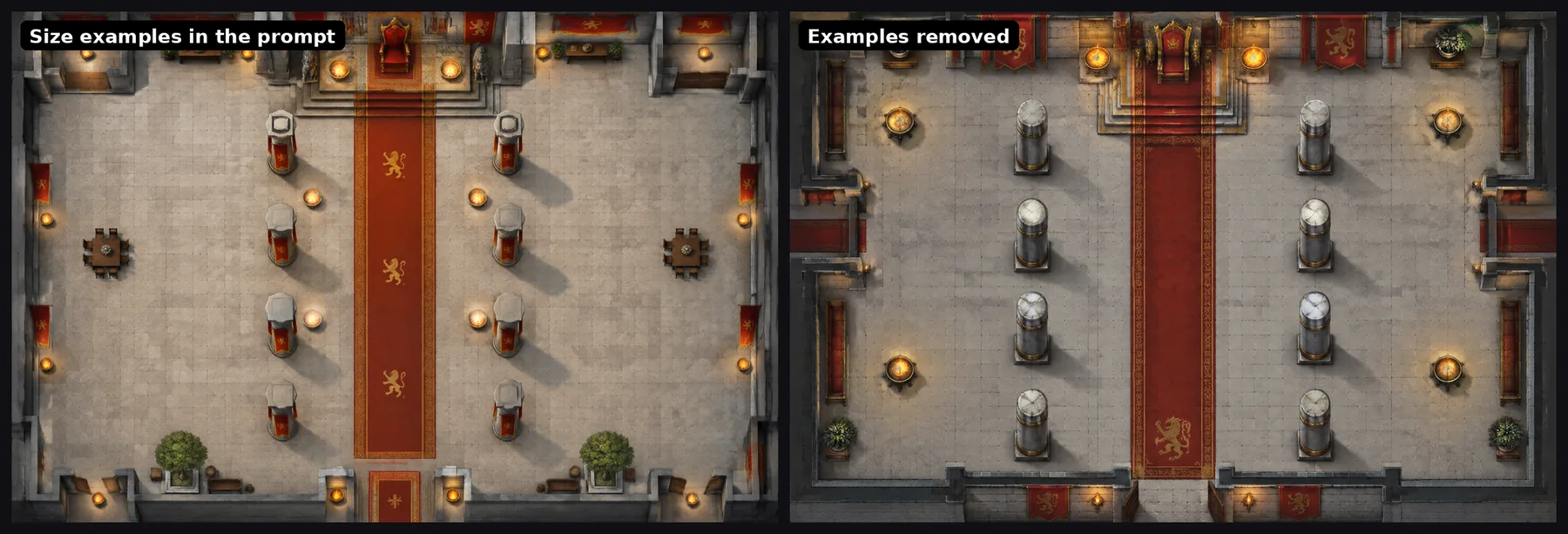
The first version of my new frame had a line that gave the model a sense of scale. It said a table for four is about 5 feet across, a barrel is about half a square, and a large tree canopy is 3 to 4 squares.
It looked harmless. It was not. The underground cavern came back with tables, barrels and a bush growing in the middle of the cave. The throne hall had potted trees and two small tables that nobody asked for. The model did not read those words as a measuring stick. It read them as a shopping list.
We had already learned this lesson once. Our NPC and settlement generators had a worked example name in a prompt, and that name then turned up in far too many results. A positive example in a prompt is a target, not a hint.
The fix was to keep the numbers and drop the objects. The frame now gives door and corridor widths, asks that every object keeps its real size, and asks for only what belongs in the place. I rendered the two worst scenes again with the change.
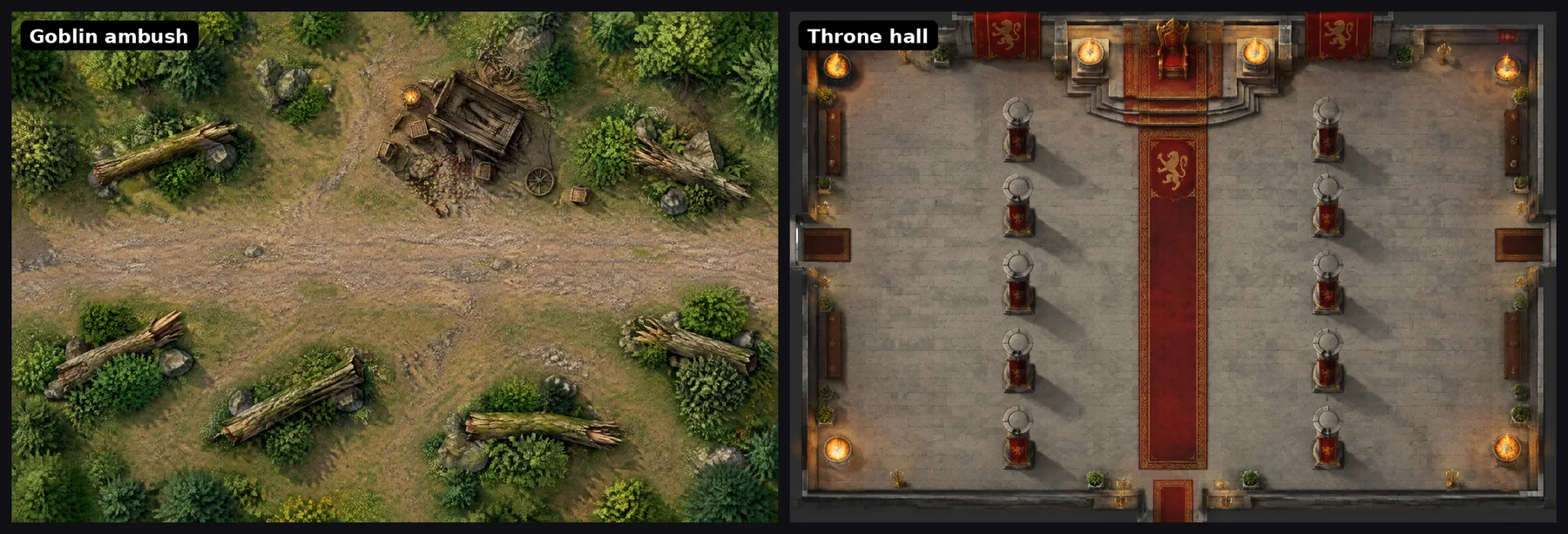
The maps in the test were made before release, with the frame sent by hand. After the worker, the backend and the site all shipped, I sent the same six sentences through the live battlemap flow, with no help from me. The result held: six top-down maps, no text, no creatures, no painted grid. The goblin ambush came back as a road with fallen logs and a broken cart, and no goblins. The throne hall has no lettering, even though the sentence names a king.
Real maps from the site, made again
The test above used scenes I wrote for the test. I also wanted to see what happens to maps people already see on CharGen. The battlemap page shows eight example maps, each with a short sentence under it.
These maps were made over the last year, on different models and settings, and I do not have the original prompt for every one. So this is not a strict test of one prompt against another. It shows what you get today when you type the sentence from the page. After the change went live, I sent each sentence through the normal battlemap flow: GPT Image 2.5 Flare, Low quality, 2 gold each, at the new size for its shape.
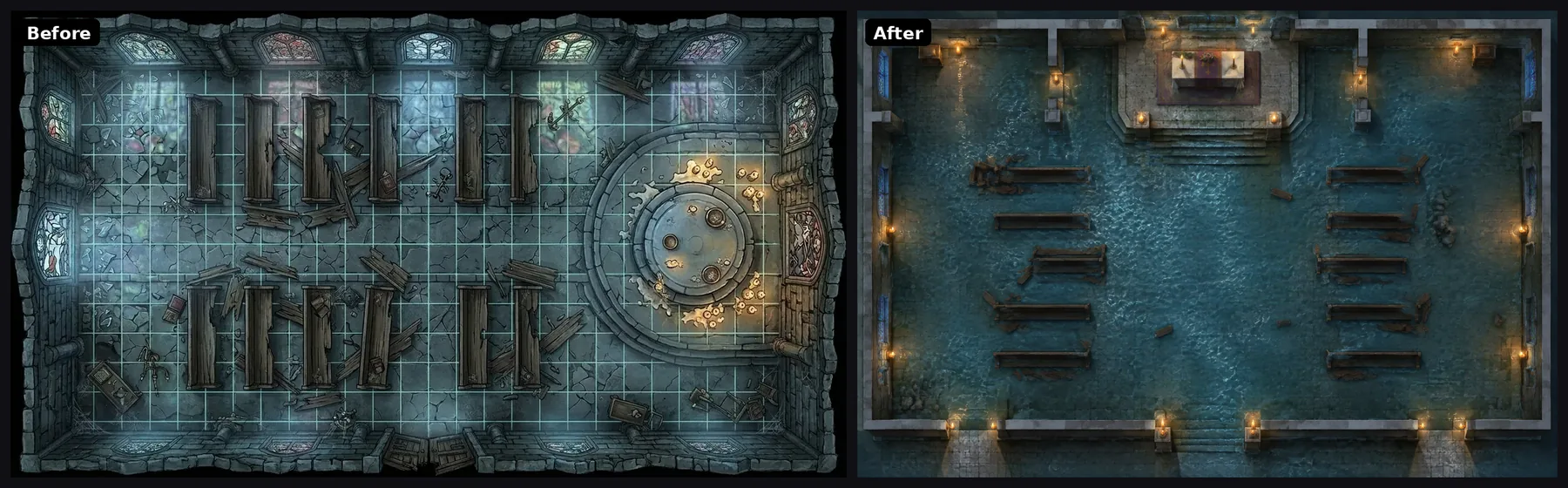
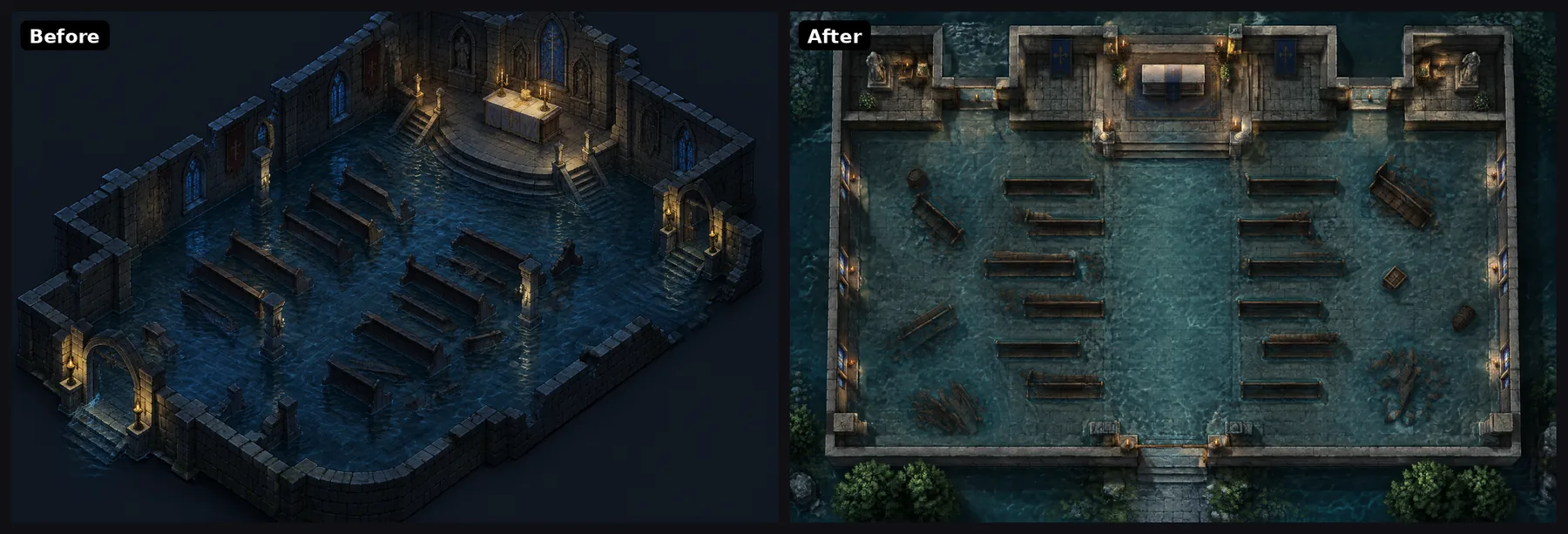
The old chapel has a grid painted into the art. The lines are bright, they run over the pews, and they do not match any VTT scale. The sentence asks for knee-deep water, and the floor is dry. The new map is flooded and has no grid. You add the grid when you download.
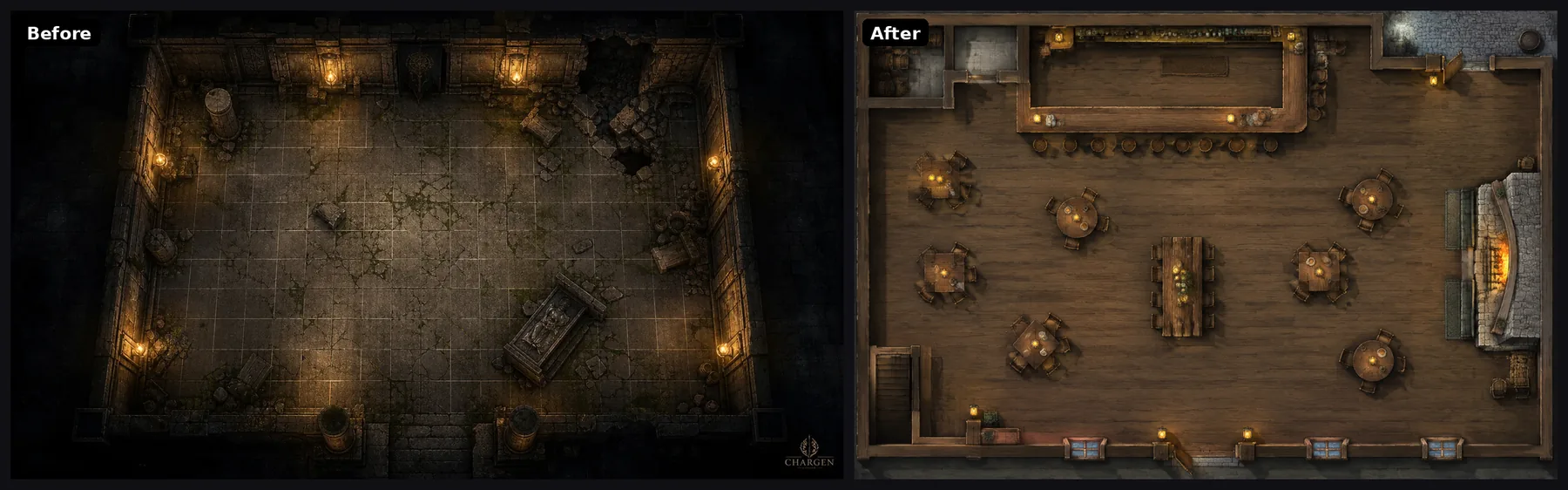
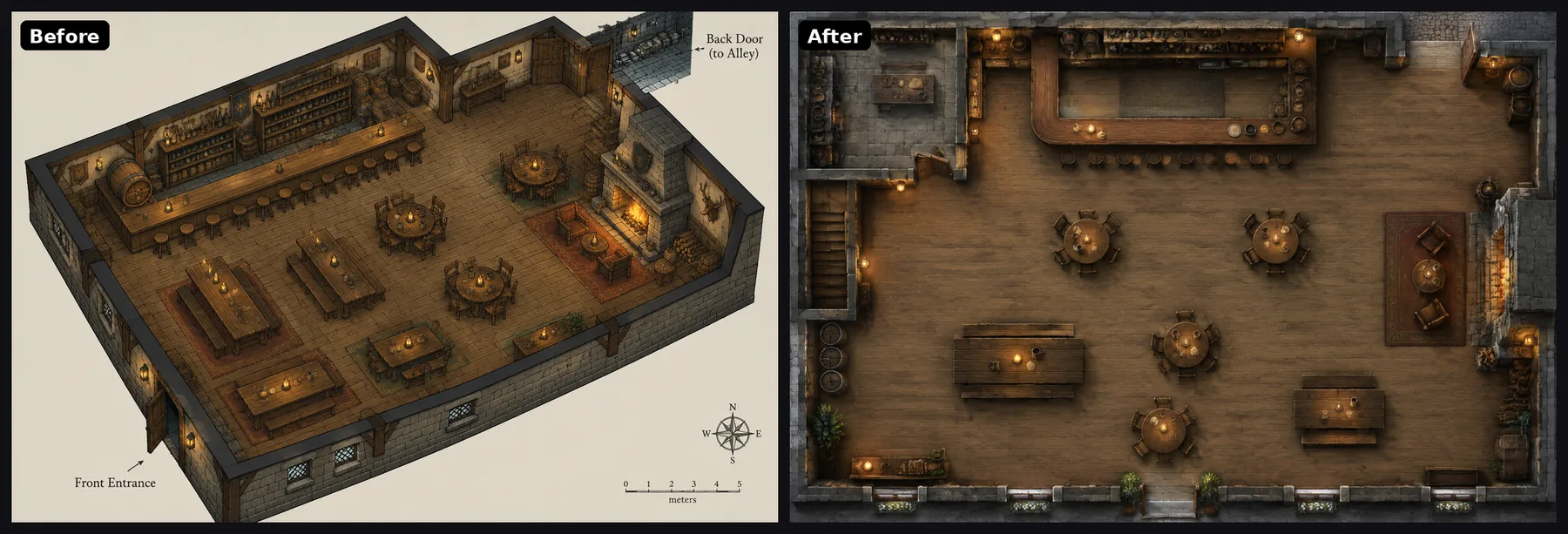
This one surprised me. The old picture next to the tavern sentence is not a tavern. It is an empty stone hall with a coffin in it. The new map has the long bar, the tables, the hearth and a back door.
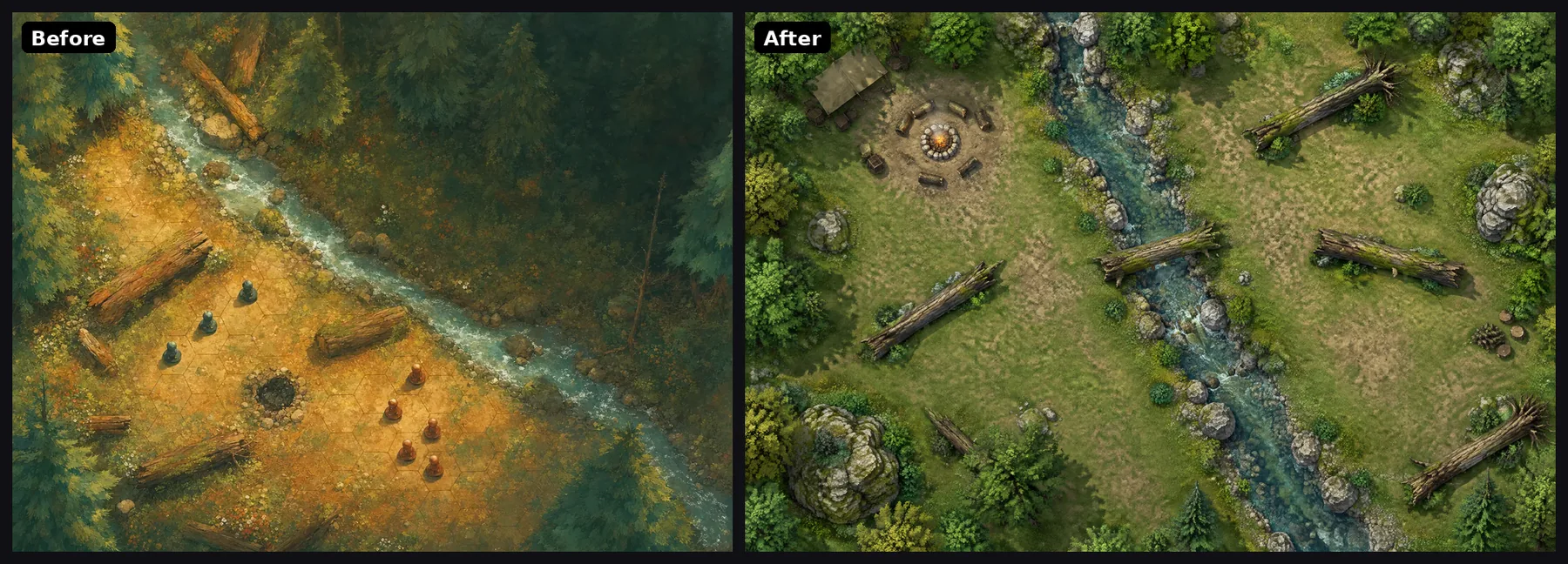
The old forest clearing is a nice picture. Look closer and it has a hex grid and eight miniature figures painted into it. On a VTT you would have two sets of tokens, and you could not move the painted ones. The new map has the stream crossing, the logs and the campfire, and no figures. It also added a small tent that the sentence did not ask for. For a camp, I will keep it.
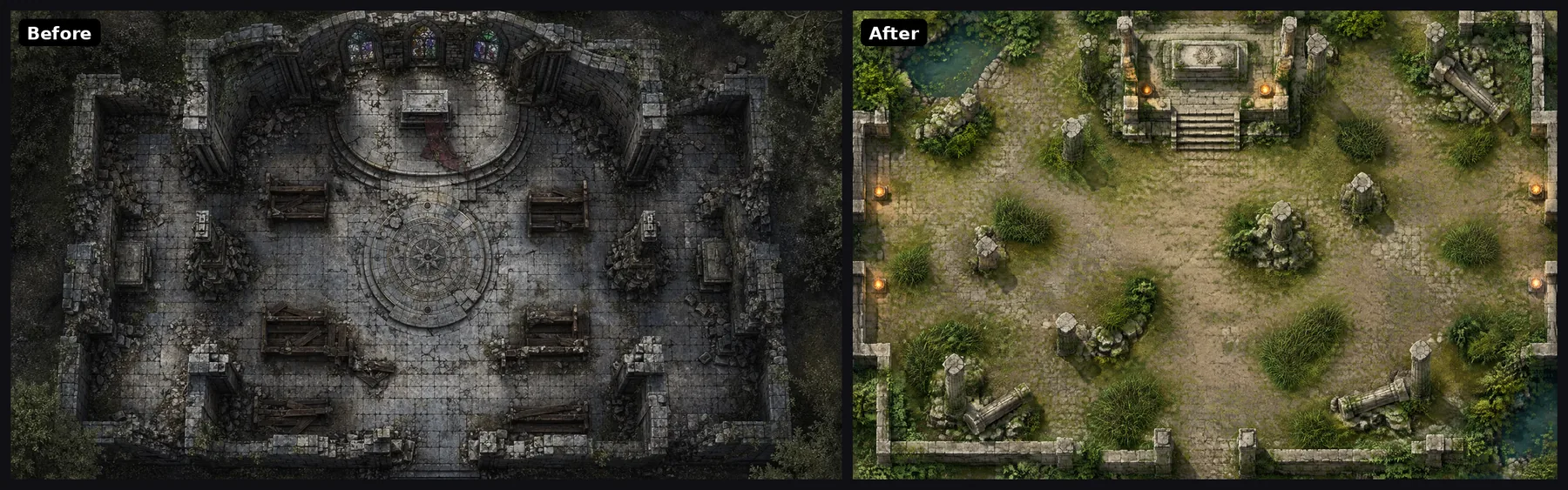
The old ruin is one of the better old maps. It is top-down and it reads well. But it looks like an intact chapel with benches, and the tall grass from the sentence is not there. The new map has the grass for cover and much more open floor.
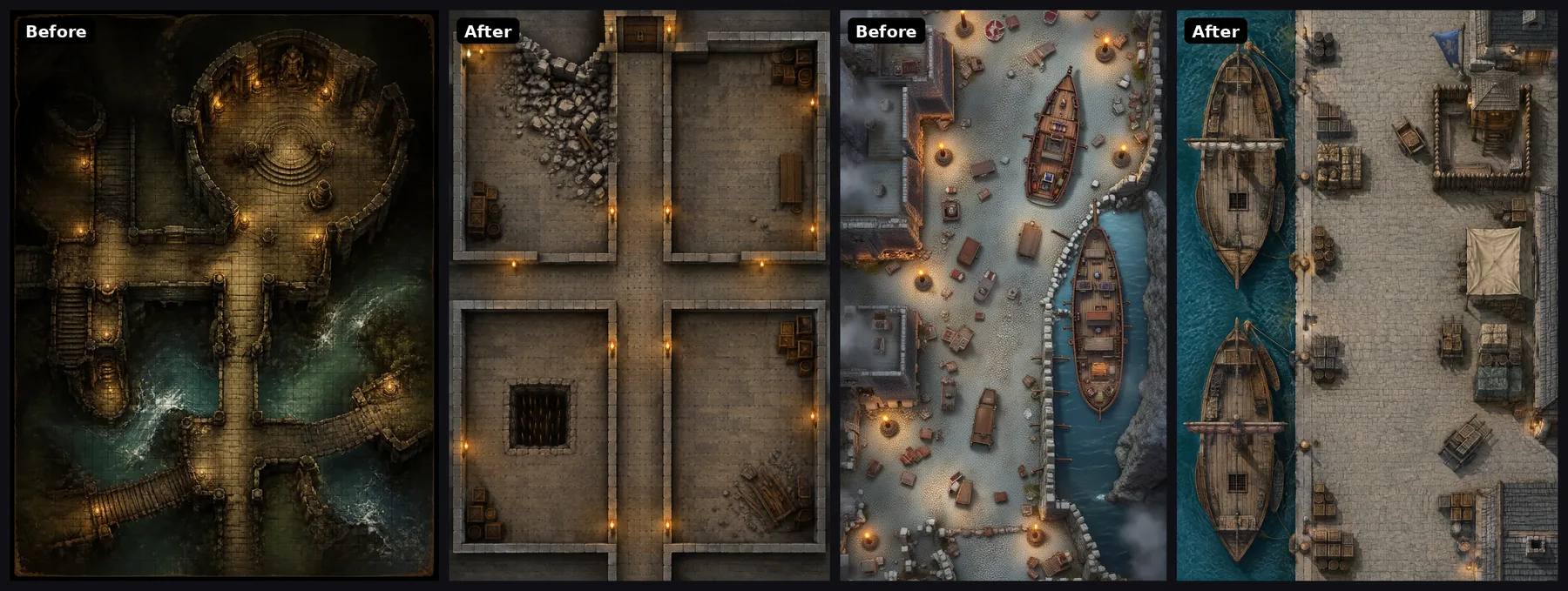
The old dungeon is a moody temple with bridges over water, with a fine grid painted over it. I could not find the pit trap or the locked door. The new map has the crossroads, the collapsed wall, the pit trap and the door. It is also plainer, and that is a fair point against it. The frame asks for the look the scene describes, so a plain sentence gets a plain map. If you want drama, put it in the sentence or pick a style.
The old harbour is at a slight angle, with fog in the corners. The new one is flat: two ships at the quay, stacked cargo and a guard post.
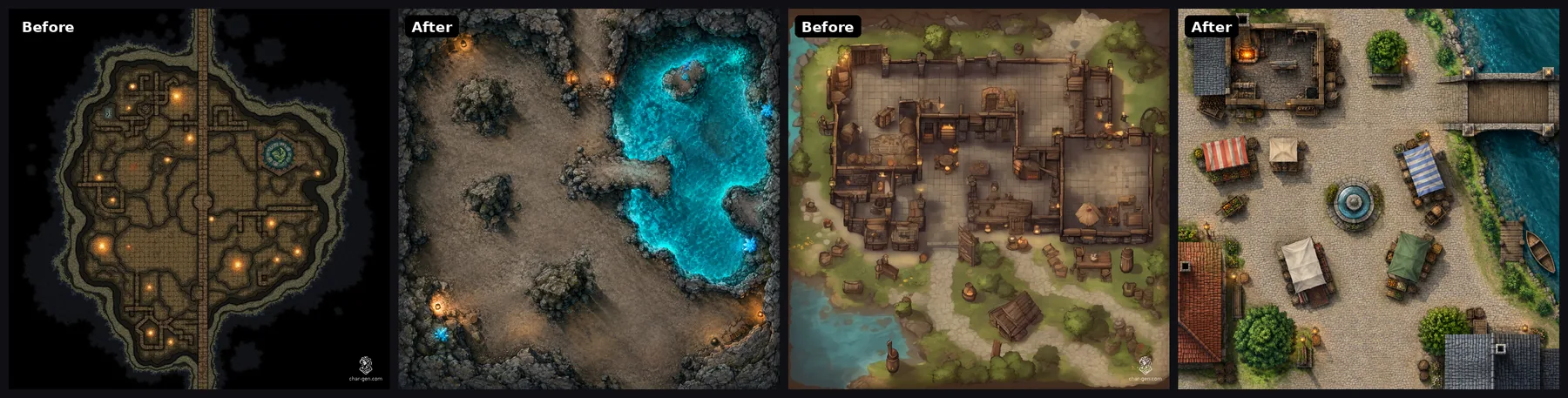
The old cavern is a cave outline with building walls inside and a straight road through the middle. The new one is a cave, with a glowing pool, rock ledges and one narrow way through. The old village square has no bridge and no market, and some of its props are drawn from the side. The new square has the smithy with its forge, the bridge and the stalls. It also added a fountain.
The count for the eight site maps:
| Old maps on the page | Same sentence, new flow | |
|---|---|---|
| Grid painted into the art | 3 of 8 | 0 of 8 |
| Miniatures painted into the art | 1 of 8 | 0 of 8 |
| Something the sentence names is missing | 5 of 8 | 0 of 8 |
| Straight top-down view | 4 of 8 | 8 of 8 |
The new maps are not all better pictures. The old dungeon and ruin have more mood. But every new map is one you can drop into a VTT and play on, and each one has what the sentence asked for.
My own old maps, and a surprise with Sunburst
Last, I went through my own gallery. I picked three battlemaps I made on CharGen between June and September: an ambush at a fortress gate (the automatic picture from an Encounter), a causeway to a lighthouse in a storm, and a fight in a timber mill. All three are good pictures. All three are at an angle, and all three have figures painted in: a troll at the gate, a shark under the causeway, and fighters in the mill.
I tried two ways to fix each one. First, I described the place again in one sentence and sent it through the new flow. Second, I gave the old map to GPT Image 2.5 Sunburst as the sketch, which is what the battlemap page does when you upload an image.
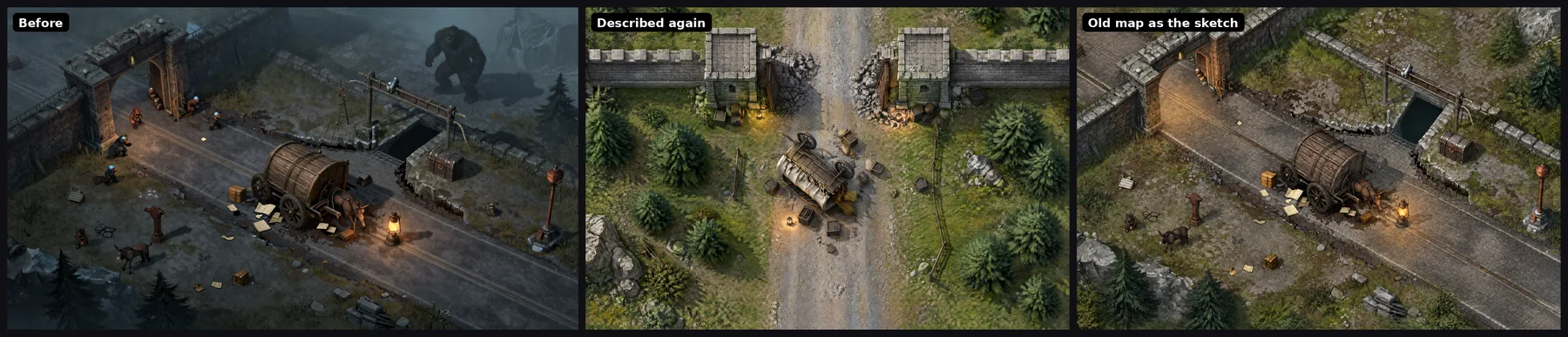
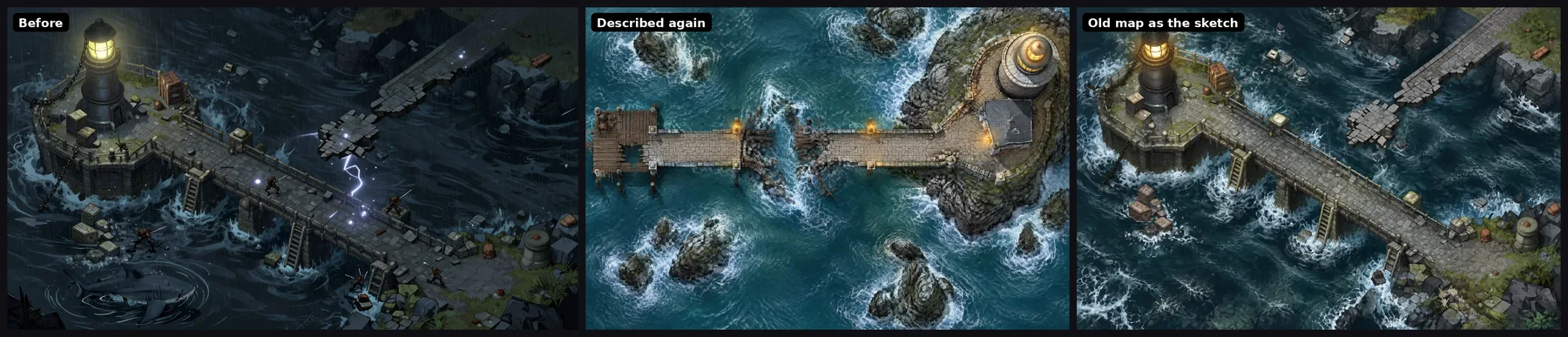
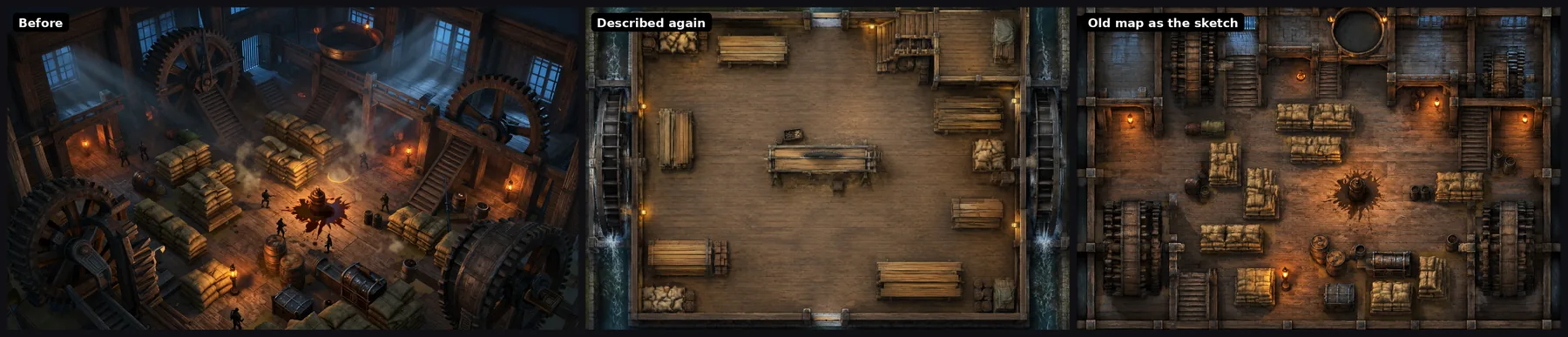
Described again, all three came back top-down with nothing living in them. That is the same result as the other tests.
The sketch route surprised me. Sunburst took out the fighters, the shark and the lightning, but it kept the camera. The gate and the causeway came back at the same angle as the old pictures, and the gate kept its two mules. Only the mill turned into a near top-down floor. The frame tells Sunburst to keep every wall and path where the supplied image puts them, and it did. In an angled picture, the walls are at an angle.
So on the day this post went out, the sketch route was only for what it says: a sketch or a floor plan seen from above. That changed a day later. See the update below.
Other things that changed at the same time
- Sketches and floor plans. If you upload a sketch on the battlemap page, the page now switches to GPT Image 2.5 Sunburst, which is the better model for editing a supplied image. The frame tells it to keep every wall, door and route where your drawing puts them. An old picture drawn at an angle now works too (see the update below).
- Encounters. The Encounter generator's automatic picture is now a top-down battlemap of the place where the fight happens, not a cinematic scene.
- Dungeons. The Dungeon generator's overview map for the GM keeps its style. It is now bigger, so the numbered rooms are easier to read.
- The model arena. Battlemap comparisons in the arena now send every model the same battlemap frame, so the vote compares models and not prompts.
Update, 27 September: an angled picture as the sketch
The result above bothered me, because an old map is the first thing many people will try to upload. So I tested three more ways to handle it.
First, I changed the words in the frame to ask Sunburst to redraw the layout as seen from directly above. Sunburst did not move the camera, and the shark came back. An edit model keeps the camera of the picture you give it, whatever the prompt says.
Second, I took the picture away. I wrote down what is on the ground in each old map, as seen from above, and sent only the words. Every map came back top-down, on Flare and on Sunburst, and the gate, the road and the causeway stayed where they were.
Third, I checked that a real top-down sketch still works as before. It does: Sunburst keeps its walls and rooms almost exactly.
So CharGen now looks at the picture before it draws anything. A sketch, a floor plan or a top-down map stays the layout, as before. A picture drawn at an angle gets read instead. A vision model writes down the place as seen from above: the back of the picture is north, the left is west, and every wall, path and water edge gets a place and a rough size in squares. People, creatures and animals are left out. The map is then drawn from those words, and the old picture is not sent to the image model.
My first version of this passed all of its tests and failed on the site. The battlemap page sends its requests down a second route in the worker, and that route still sent the old picture with the words. The picture won, and the gate came back at its old angle. One more line fixed it, and this is the result with my three old maps on the live site:
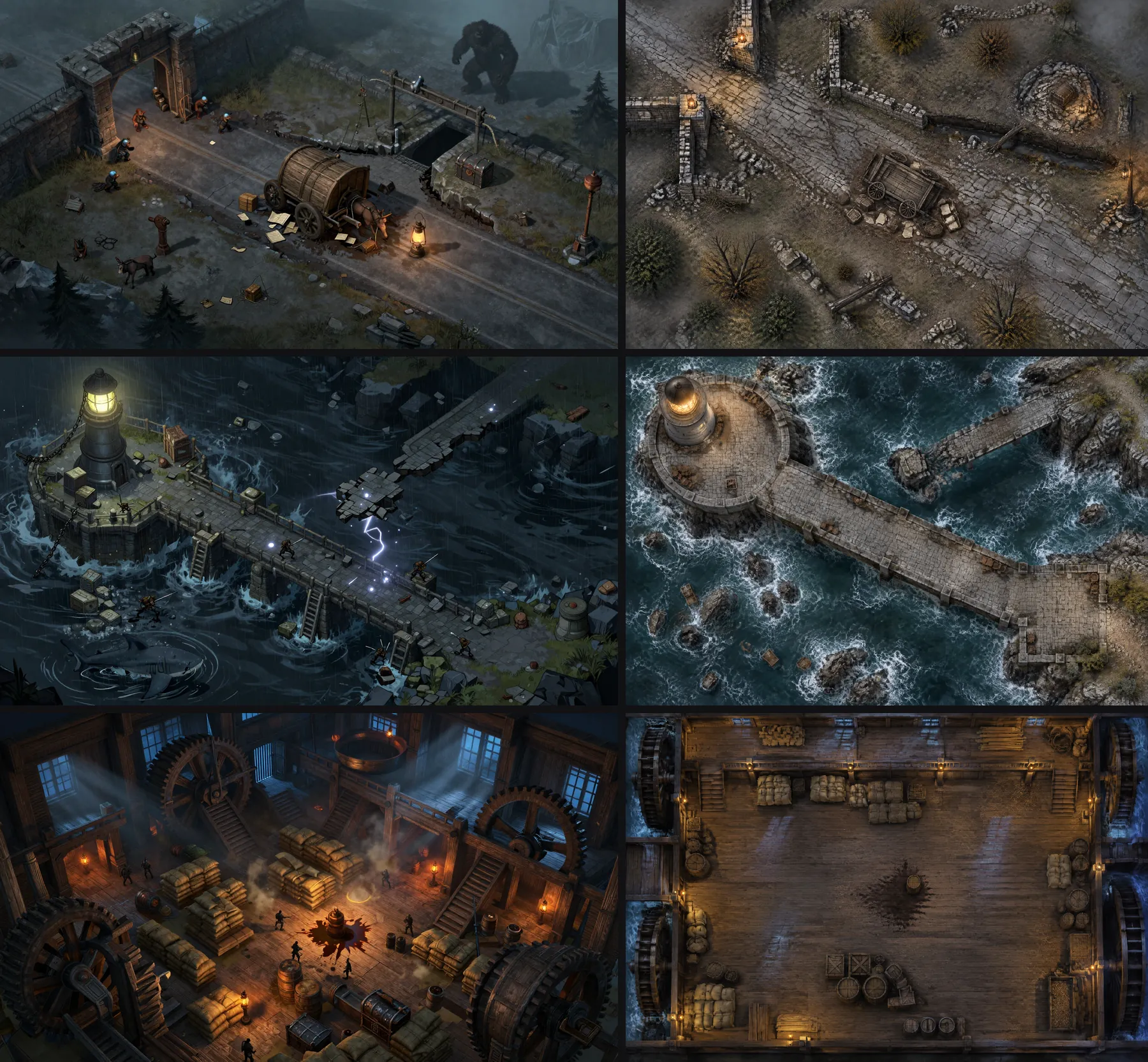
The new maps are not copies of the old pictures. What cannot be seen from above, such as the side of a tower, is made up again. But the place is the same place, and you can put tokens on it.
What comes next
A good top-down image is only half of a VTT map. The other half is walls, doors and light that the VTT understands. Today you still draw those by hand in Foundry.
The next step I am testing starts from a layout instead of a picture. The layout lists rooms, doors and obstacles on the grid. Code checks that every room can be reached. Then an image model paints that layout. Because we know where every wall is, we can export the walls and doors with the image. I will write about that when it is ready for the table.
If you make a map and it comes back wrong, send it to me on the CharGen Discord. The maps that fail teach me more than the ones that work.
Image credits:
- All maps in this post were generated with CharGen by the author: GPT Image 2.5 Flare for new maps, GPT Image 2.5 Sunburst for the maps made from an old map. The "before" maps are earlier CharGen maps, made with the models of the time.
Frequently asked questions
- Why did AI battlemaps come out isometric?
- Our old prompt started with the words 'planimetric view isometric view'. Newer image models follow each word, so the word isometric won. The new prompt asks for one camera: straight down.
- Does the AI draw the grid on the map?
- No. A grid that an image model draws is rarely even. CharGen adds a square or hex grid when you download the map, at the scale your VTT uses.
- What size are CharGen battlemaps now?
- On GPT Image 2.5 a landscape map is 2304 by 1536 pixels, which is 30 by 20 squares at about 77 pixels a square. Portrait is 1536 by 2304 and square is 1360 by 1360. All three cost 2 gold at Low quality.
- Can I turn my own sketch into a battlemap?
- Yes. Upload a sketch or a floor plan on the battlemap page. The page switches to GPT Image 2.5 Sunburst, which follows a supplied image more closely, and keeps your walls, doors and rooms. You can also upload an old picture drawn at an angle: CharGen reads it first and makes a top-down map of the same place.