
Campaign Writing Tool for D&D: Inside CharGen Studio
See how this campaign writing tool for D&D keeps notes, sessions, world records and reviewed AI ideas in one writing room.
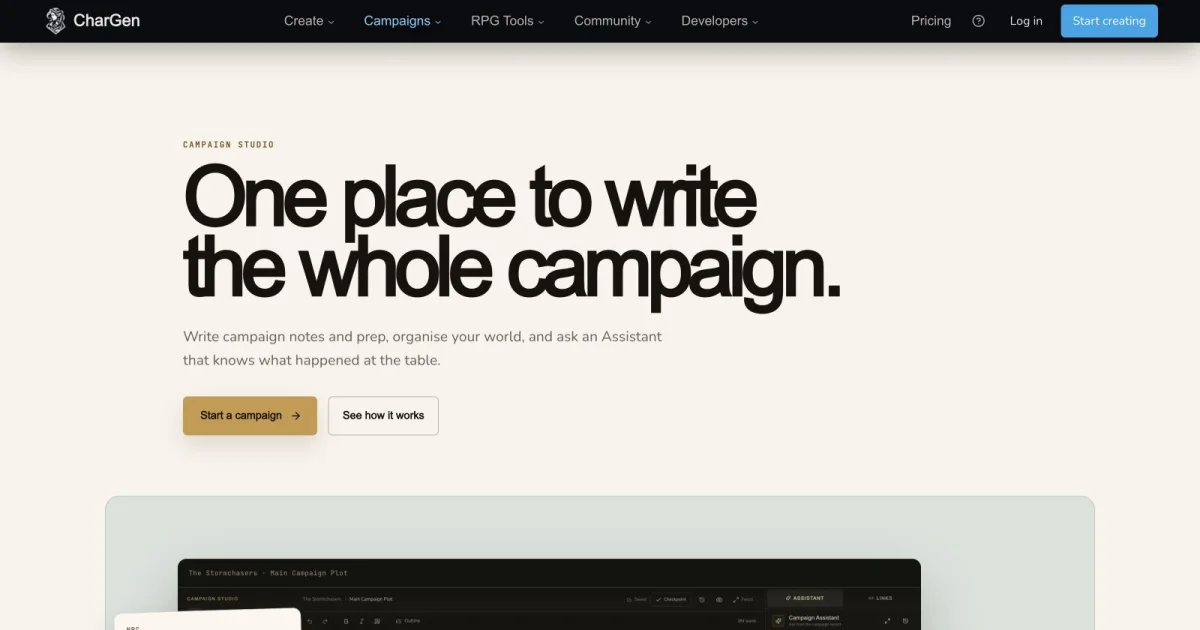
I wanted a campaign writing tool for D&D after losing the same detail three times. A faction name sat in a text message. An NPC portrait lived in an image folder. The session recap waited in a document I forgot to open.
The campaign still worked. My notes did not.
Campaign Studio puts those jobs in one writing room. I can write a note, search the campaign, check a session record, ask for a source-backed suggestion, and review the result before it changes anything.
That last part matters. A campaign assistant should not turn a confident sentence into canon. I want the tool to show what the campaign already knows, what it inferred, and what it invented for me to consider.
What a campaign writing tool for D&D needs to keep together
Most campaign tools solve one part of the problem. A notes app stores prose. A wiki stores reference pages. A session tool stores recaps. An image tool makes portraits and maps.
The work still crosses those boundaries.
I write a scene about a harbour. I need the name of the captain from session 14. I need the faction that controls the dock. I need a portrait for the NPC. I need a short brief for next week's session.
Copying those details between tabs creates small errors. A spelling changes. A location moves. A dead NPC returns because the latest note was not in the prompt.
Campaign Studio treats the campaign as the working project. Notes, sessions, world records, quests, threads and relationships sit beside the writing surface. The Assistant can use selected campaign sources, but it does not get to change them by itself.
| Tool type | Strongest use | The gap I still feel |
|---|---|---|
| Plain document | Fast prose and shared editing | Campaign facts stay scattered across pages |
| Markdown vault | Local files, links and personal control | You still build the campaign workflow yourself |
| World wiki | Public lore, maps and structured articles | Writing and session prep can remain separate jobs |
| Session note tool | Recaps and transcripts | The result may not connect to the next piece of prep |
| Campaign Studio | Notes, sources, reviewed AI help and prep in one campaign | It is not a full VTT or a replacement for GM judgement |
Campaign Studio is not trying to win every category. It is a writing-focused workbench for the point where campaign material becomes useful again.
Campaign Studio starts with your existing campaign
The public Campaign Studio page now explains the workbench with a real campaign example. The signed-in shelf at /studio lets me reopen a recent campaign or choose another writing room.
The important detail is the storage model. Campaign Studio uses the existing campaign notes and folders. It does not create a second campaign database and ask me to copy everything across.
That makes the first step simple. I open a campaign note that already contains the party's current position. I do not start by rebuilding a wiki.
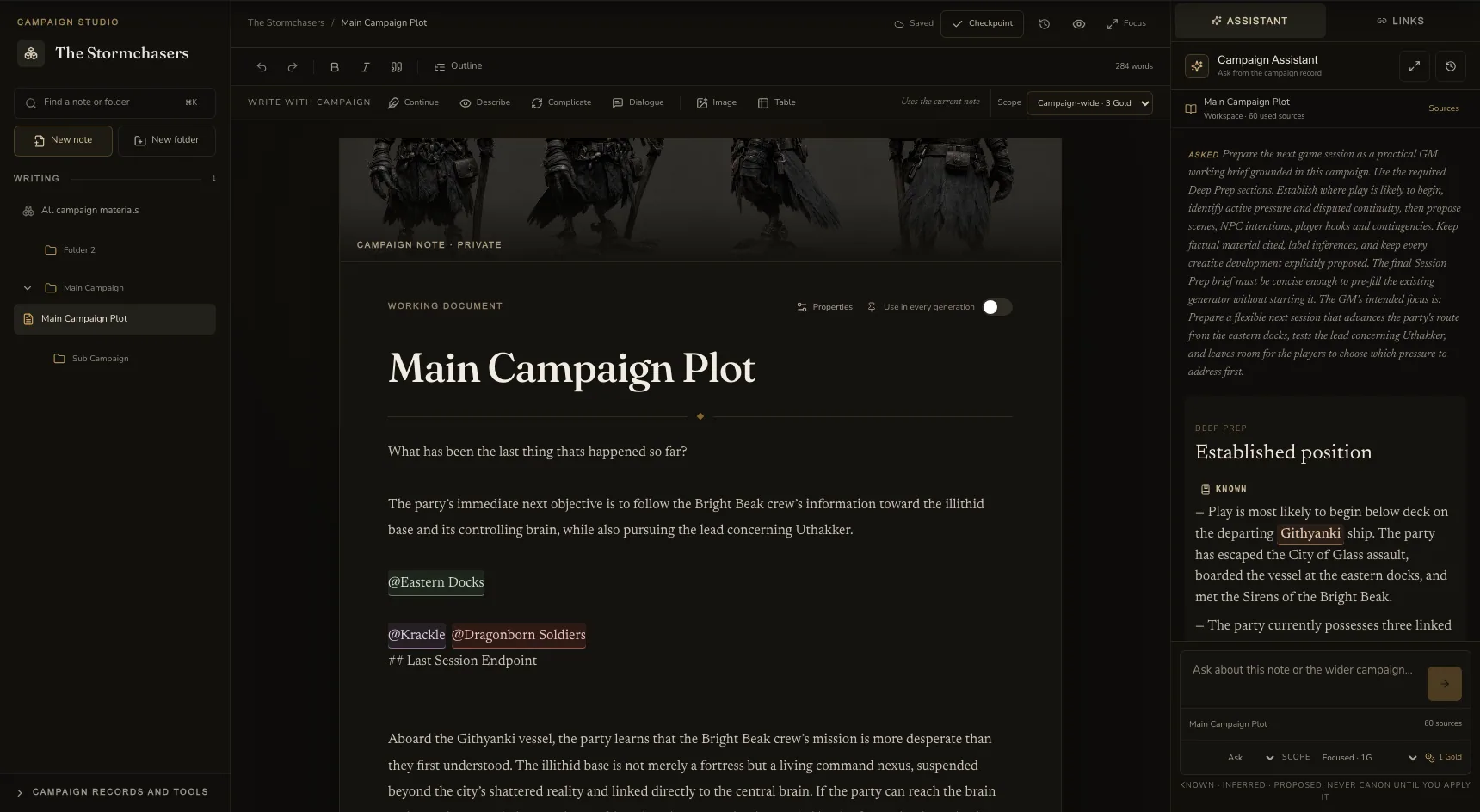
The campaign navigator keeps the document tree visible. I can create a note, create a folder, rename a folder, move a note, or leave it under Unfiled notes. Those are ordinary writing tasks, so they belong beside the manuscript.
The campaign dashboard also has an Open Campaign Studio action. Campaign cards use Open writing room. If a campaign cannot use Studio, its notes remain available in Campaign Workspace instead of stopping at a dead end.
That fallback is not exciting. It is useful. A writing tool should not hide my notes because one new surface is unavailable.
Write in a real campaign note, not a decorative prompt box
The centre of Studio is a document editor. It has an editable title, a Markdown-compatible body, a save state, a word count, selection feedback, and a pin-to-generation control.
I can write the scene myself. The Assistant sits beside the page when I need help. The page remains the primary surface.
The editor autosaves after a short delay. It also has a Save now action for the moment when I want to stop and verify the note. New notes stay local until they contain enough information to save.
That feels different from a generic chatbot. The document has a place in the campaign. It has a folder. It has a revision. It can be found again.
Here is a small example I would use with a campaign called Stormchasers:
- Create a note called
The North Gate aftermath. - Write three paragraphs about the party leaving Orlan behind.
- Mention Lady Serane Veyra at the point where she appears.
- Pin the note before asking the Assistant what the envoy already knows.
- Save the note, then return to the campaign navigator.
The mention is not only a formatting trick. It gives the writing surface a way to connect the prose to a campaign record.
The same approach works for a preparation note. I can write the scene objective, list the NPCs who may interrupt it, and keep the unresolved question in the same document. I do not need to open a separate task board for every loose thread.
Ask the Campaign Assistant from the passage you are writing
The best part of an AI session prep tool is not a large answer. It is the right context.
Campaign Studio lets me select a passage in the editor. The selection stays attached when I move to the Assistant. That means I can highlight one paragraph and ask about that paragraph, rather than sending the entire campaign every time.
The writing surface includes four focused actions:
Continuewrites proposed prose in the established voice.Describeadds sensory detail to the selected passage.Complicateadds pressure linked to campaign material.Dialoguedrafts speech that fits the known character context.
I can also use a custom question. I might ask, “Which open quest could affect this scene?” or “Where did the party first hear this name?”
The response separates different kinds of information. KNOWN refers to a campaign record. INFERRED explains a conclusion drawn from the sources. PROPOSED marks creative writing. DISPUTED flags a record that needs care.
The source chips are just as important as the prose. They show which note, session, transcript window, entity, quest, or relationship supported an answer.
Suppose I select this line:
The envoy waits beside the north gate, holding the key that the party lost in the marsh.
I can ask Complicate. A useful response might point to the session where the key went missing, then propose that the envoy found it through a rival faction. The fact and the idea should not look like the same claim.
The Assistant also keeps the current campaign thread. I can return to an earlier exchange without reconstructing the same context from memory.
Review before a suggestion becomes campaign canon
Campaign writing tools need a clear boundary between draft text and established truth.
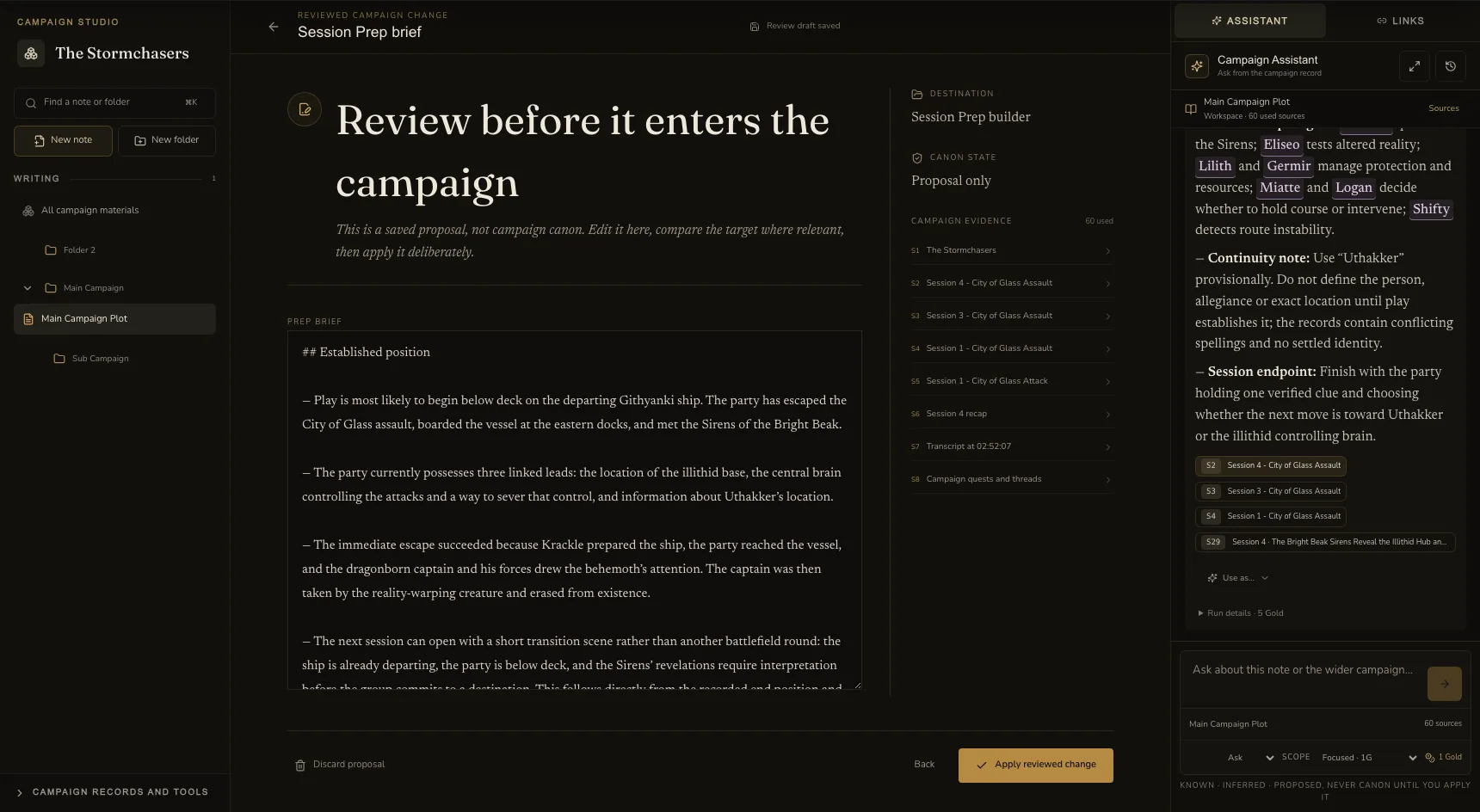
Campaign Studio gives proposed responses explicit actions. I can Insert the text at the selected point, Replace the selection, or create a New note.
Those actions change the draft first. They do not silently write to the campaign because the Assistant produced a response.
For a tracked entity, quest, thread, or prep brief, the workflow opens a review desk. I can inspect the destination, edit the proposed fields, compare the current record, read the evidence, and then choose Apply.
The service checks campaign access and the current record version again. If another change happened while I was reviewing, the proposal returns as stale instead of overwriting newer work.
That is the behaviour I want from a D&D worldbuilding writing tool. A proposed faction goal should be easy to accept, but it should not become history because I clicked the wrong button.
The same rule applies to generated assets. Campaign Studio can hand an approved idea to an existing generator. The generator still shows its quote and waits for an explicit start. Image, video, and Session Prep costs do not hide inside an Assistant response.
Keep sessions and world records beside the note
The writing room becomes more useful when it can answer questions about what happened at the table.
Campaign Studio can work with session recaps, structured events, and bounded transcript windows. Transcript rows retain speaker labels and timestamps when those details exist. The Assistant does not load a multi-hour transcript into every answer by default.
The World desk combines tracked campaign entities with live World Codex references. The Timeline desk groups structured events by session. Relationships shows records that appeared together, but it does not pretend that co-occurrence proves friendship or betrayal.
Campaign Find searches notes, entities, quests, threads, and sessions. I can open a result inside Studio and keep the Assistant beside it.
That gives me a practical way to answer a player at the table. I can search for “the silver key”, open the matching note, inspect the session source, and decide what the campaign should reveal.
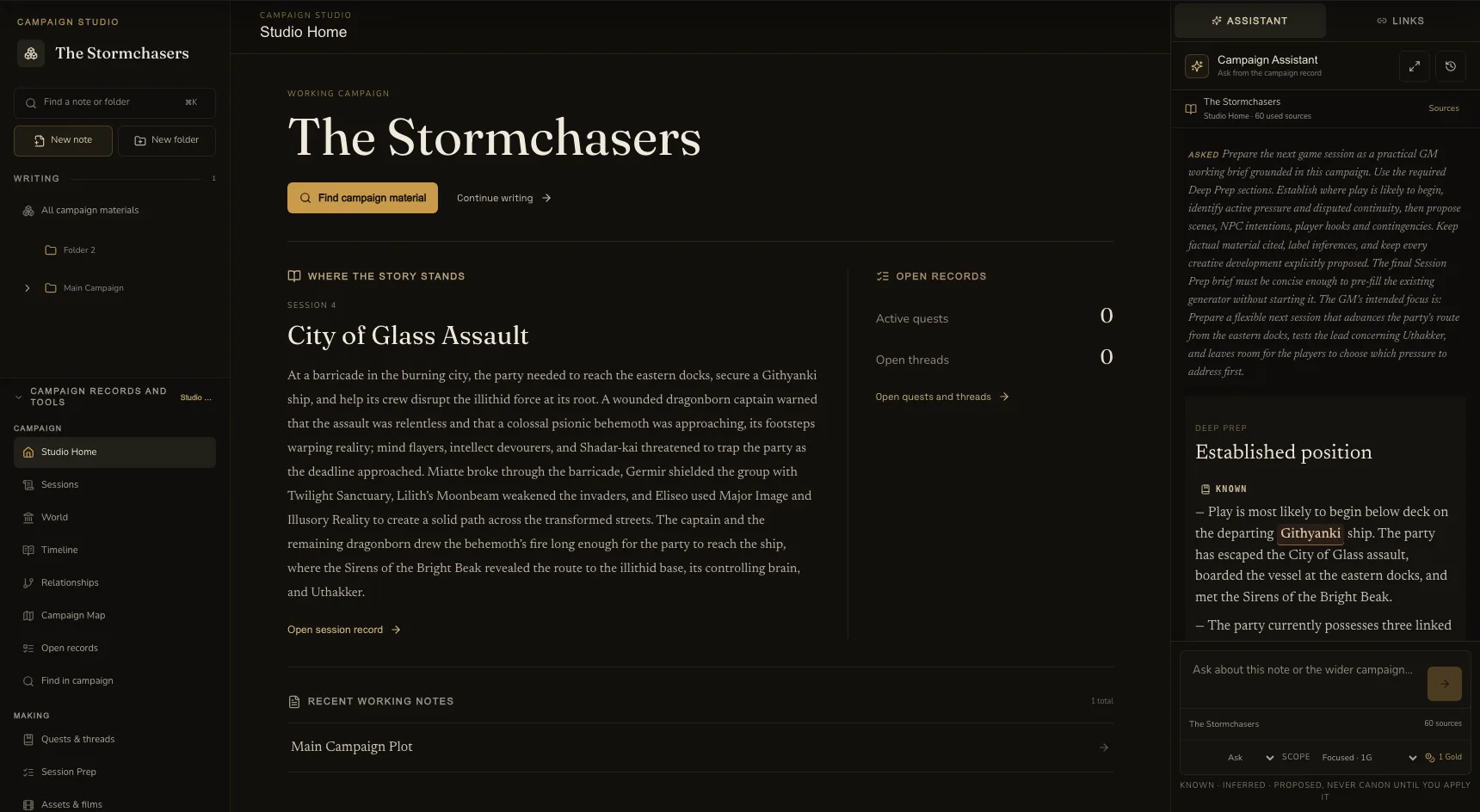
The system still has limits. Timeline and relationship views are read-first when no established write service owns a change. The Assistant does not create a private route around that boundary.
When the writing is ready for a table, I can move the approved brief into Session Prep. When the result needs a persistent entity, I can continue in World Codex. The handoff keeps the next action explicit.
A 30-minute Campaign Studio workflow
I would not begin by importing every old note. I would test the loop with one active problem from the next session.
| Time | Action | Result |
|---|---|---|
| 0 to 5 minutes | Open an existing note and write the session promise | One clear reason for the scene |
| 5 to 10 minutes | Search the campaign for the location, NPC, and open quest | A small source set with names you can trust |
| 10 to 15 minutes | Select the scene paragraph and use Complicate or Dialogue | A proposed idea tied to the passage |
| 15 to 20 minutes | Read the source chips and edit the proposal | A draft that separates facts from additions |
| 20 to 25 minutes | Insert the approved text or create a reviewable entity proposal | The note stays under your control |
| 25 to 30 minutes | Open Deep Prep with a short GM focus | A sourced brief for the next session |
Deep Prep is the longer Assistant mode. It can use a bounded set of recent sessions, relevant transcript windows, quests, threads, relationships, campaign notes, and selected context. It returns one working brief.
The current product copy quotes Standard Assistant runs at 1 Gold, Campaign-wide runs at 3 Gold, and Deep Prep at 5 Gold. The price appears before the run. A failed or cancelled run releases its reservation.
Applying a Deep Prep brief only pre-fills the existing Session Prep builder. It does not start a generator. I still choose the recipe, review the quote, and start generation myself.
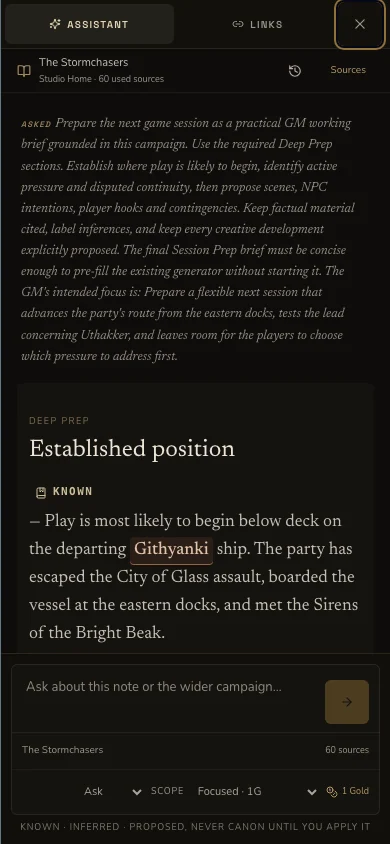
The workflow is short because it stops at a useful point. I do not need to create a complete setting before I can prepare one scene.
How Campaign Studio compares with notes apps and world wikis
A campaign writing tool does not make every existing tool irrelevant. I still like plain Markdown for private notes. Some groups need a public world site. Others only need a shared document.
Obsidian stores notes as local Markdown files. Its official data-storage guide explains that a vault is a folder on your device. That is a strong choice when file ownership and offline access matter most.
World Anvil takes a different route. Its campaign manager guide covers campaign notes, plots, players, sessions, primers and settings. It suits a GM who wants a structured world site and a player-facing presentation.
Campaign Studio fits the moment between those choices. It keeps the writing surface inside an existing CharGen campaign and adds source-backed help, entity generation, session records, relationships, and reviewed handoffs to other tools.
| If you care most about... | Start with... | Choose Campaign Studio when... |
|---|---|---|
| Local files and full control | Obsidian | You want the Assistant to use campaign records without copying them into prompts |
| Public world articles and maps | World Anvil | You want notes and reviewed prep in the same campaign writing room |
| Simple shared documents | Google Docs or a similar editor | You want session, world, and quest context beside the manuscript |
| Live maps and combat | Your preferred VTT | You need a preparation workbench before the table opens |
I would not move an entire campaign on day one. Open one note. Test one search. Ask one question. Review one proposal. That shows the real fit faster than a feature checklist.
What Campaign Studio does not try to do
Campaign Studio is not a virtual tabletop. It does not replace Foundry, Roll20, or D&D Beyond Maps for live movement, fog, initiative, or token placement.
It is not an automatic Dungeon Master. It cannot decide what your table enjoyed. It cannot fix a contradiction that your group has not resolved. It can show the conflicting records and propose a way forward.
It is not a fully collaborative editor. The current workbench focuses on campaign-owned writing, review, and preparation. Shared editing and server-side revision history remain separate concerns.
It also does not make every action free. Assistant runs have visible Gold quotes. Generator jobs keep their own confirmation and charge flow. That separation is helpful when a quick writing question should not start a costly image or video job.
Some campaigns may also open the legacy Workspace when Studio access is unavailable. That is expected during rollout. Your notes should remain available while the new writing room expands.
My recommendation
If your D&D notes already live in three or four places, test Campaign Studio with the next scene you need to write. Use an existing campaign note. Search for one NPC. Select one paragraph. Ask one focused question. Review the response before you apply it.
That small test tells you more than a long tour. You will see whether the source chips help, whether the record links match your campaign, and whether the writing surface feels calm enough to use every week.
For me, the useful change is not that the Assistant can write a paragraph. Many tools can do that. The useful change is that the paragraph can sit beside the campaign record, remain proposed while I check it, and move into the note only after I choose.
Open Campaign Studio, bring one live campaign problem, and keep the first review small.
Frequently asked questions
- What is a campaign writing tool for D&D?
- A campaign writing tool for D&D helps you write and organise notes, sessions, characters, places, quests and plot threads in one campaign space. CharGen Campaign Studio adds a source-backed Assistant that keeps suggestions separate from campaign canon until you review and apply them.
- Does Campaign Studio replace Campaign Workspace?
- No. Campaign Studio uses the same notes and folders as Campaign Workspace. Eligible campaigns open those records in the Studio workbench, so existing material stays in the same campaign rather than moving into a second database.
- Can the Campaign Assistant tell facts from ideas?
- Yes. Responses label known facts, inferences, proposed ideas and disputed records. Source chips show where factual answers came from. Proposed writing stays outside canon until you explicitly insert, replace or approve it.
- How much does Campaign Studio cost to use?
- A Standard Assistant run costs 1 Gold, a Campaign-wide run costs 3 Gold, and Deep Prep costs 5 Gold. The price appears before you send the run. Failed or cancelled runs release their reservation.
- Is Campaign Studio a virtual tabletop?
- No. It is a campaign writing and preparation workbench. Use a VTT for live maps, tokens and combat. Use Campaign Studio to keep notes, sessions, world records and reviewed preparation together.